
Screen package guide
Save desktop, window and area screenshots on Windows.
Version 2.17.1. Installed versions can differ. Examples are illustrative and not tested. Packages.
Prerequisites
The package saves what is on a signed-in, unlocked Windows screen. Keep the window open and on top. The capture takes what is on screen, so a window in front shows in the image. A hidden window is not drawn. A window capture includes the window frame.
Use samples/shots/ for test captures. The file extension sets the image format.
Shared fields
- Window (
windowTitle): The title of an open window, such asInvoice Preview. A missing window fails. - Title matching (
windowMatch):Containsfinds part of the title.Exactneeds the whole title. Both ignore case. If several windows match, the window from the newest process is used. Choices:Contains,Exact. - Destination (
filePath): The image file. Use.png,.bmp,.jpg,.jpeg,.gif,.tifor.tiff; other extensions, such as.wmf, fail. A relative path starts in the Run working folder. Missing folders are created. - Overwrite (
isOverwriteFile):falsefails if the file exists.truereplaces it.
Actions
Capture area (screenCaptureArea)
Saves a part of one window. Values are whole pixels from the window's top-left corner. An area larger than the window is cut to the window.
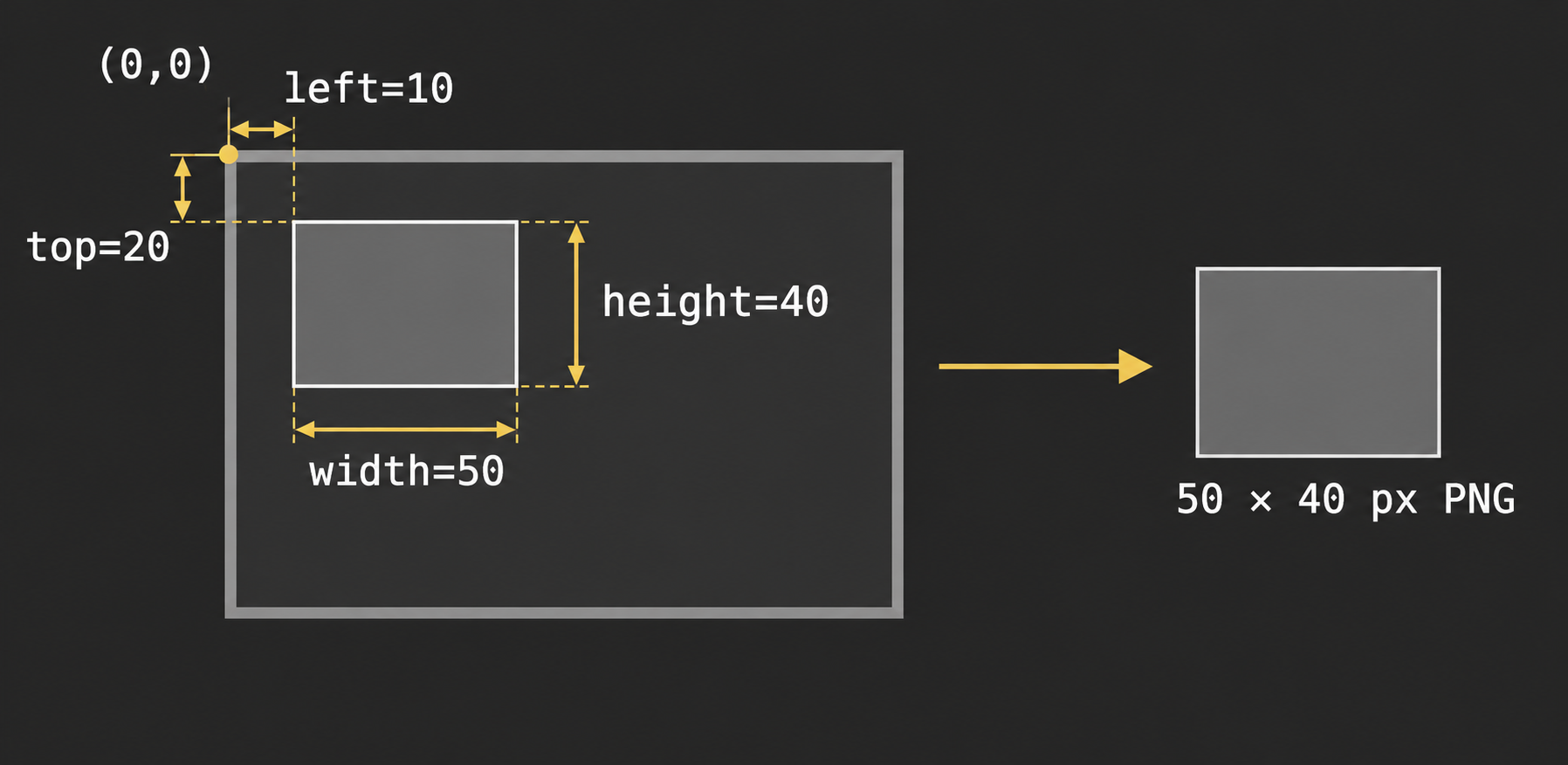
left and top from the window's outer top-left corner. This example saves a 50 by 40 pixel PNG. View full sizeInputs
| Input | Editor field | Type and runtime default | Use |
|---|---|---|---|
window | Select window | String; "" | Optional. Window. |
window | Match the title | Title; Contains | Optional. Title matching. |
left | Area left (px from the window) | Number; 0 | Optional. Pixels from the window's left edge. |
top | Area top (px from the window) | Number; 0 | Optional. Pixels from the window's top edge. |
width | Area width (px, 0 = to the window edge) | Number; 0 | Optional. Pixels. 0 or less goes to the window edge. |
height | Area height (px, 0 = to the window edge) | Number; 0 | Optional. Pixels. 0 or less goes to the window edge. |
file | File path to save image | String; "" | Required. Destination. |
is | Overwrite File | Boolean; false | Optional. Overwrite. |
Outputs
| Output | Type | Meaning and binding |
|---|---|---|
file | Any | The full path of the saved image. Bind to a File variable for later file or OCR steps. |
Example
Open a test window titled Invoice Preview at least 200 by 150 pixels. Set Select window=Invoice Preview, Match the title=Exact, Area left=10, Area top=20, Area width=50, Area height=40, File path to save image=samples/shots/area.png, Overwrite File=false. Bind file to File variable areaImage.
Expected result
A 50 by 40 pixel PNG is saved and file holds its full path. If less of the window is there, the image is cut to the window. An area with nothing left inside the window, a missing window, a wrong extension or an existing file with Overwrite false fails.
Capture desktop (screenCaptureDesktop)
Saves the whole desktop, on all monitors.
Inputs
| Input | Editor field | Type and runtime default | Use |
|---|---|---|---|
file | File path to save image | String; "" | Required. Destination. |
is | Overwrite File | Boolean; false | Optional. Overwrite. |
Outputs
| Output | Type | Meaning and binding |
|---|---|---|
file | Any | The full path of the saved image. Bind to a File variable for later file or OCR steps. |
Example
Set File path to save image=samples/shots/desktop.png, Overwrite File=false. Bind file to File variable desktopImage.
Expected result
The image covers all monitors. Gaps between monitors show as empty areas. file is its full path. An existing file needs Overwrite true.
Capture window (screenCaptureWindow)
Saves the whole window, with its frame.
Inputs
| Input | Editor field | Type and runtime default | Use |
|---|---|---|---|
window | Window title | String; "" | Optional. Window. |
window | Match the title | Title; Contains | Optional. Title matching. |
file | File path to save image | String; "" | Required. Destination. |
is | Overwrite File | Boolean; false | Optional. Overwrite. |
Outputs
| Output | Type | Meaning and binding |
|---|---|---|
file | Any | The full path of the saved image. Bind to a File variable for later file or OCR steps. |
Example
Open the test window Invoice Preview. Set Window title=Invoice Preview, Match the title=Exact, File path to save image=samples/shots/window.jpg, Overwrite File=false. Bind file to File variable windowImage.
Expected result
A JPEG of the window is saved, and file holds its full path. A missing window or a window with no size fails. A window in front also shows in the image.