
Queue package guide
Add work items, read their state, and store the result of the item assigned to a Run.
Version 2.8.2. Installed versions can differ. Examples are illustrative and not tested.
Prerequisites
Run the automation from the room with this package installed. It fails when run alone on a Device. Each request waits up to 60 seconds.
Create test queue sample-invoices. Prepare Dictionary invoice with String invoiceNo=INV-9 and Number amount=12.5. Record columns can also become content keys. Bind whole references such as $invoice$ to keep the types.
The room picks items, starts Runs, retries and completes items. These actions do not. Set work item result works only on the item the room gave to this Run.
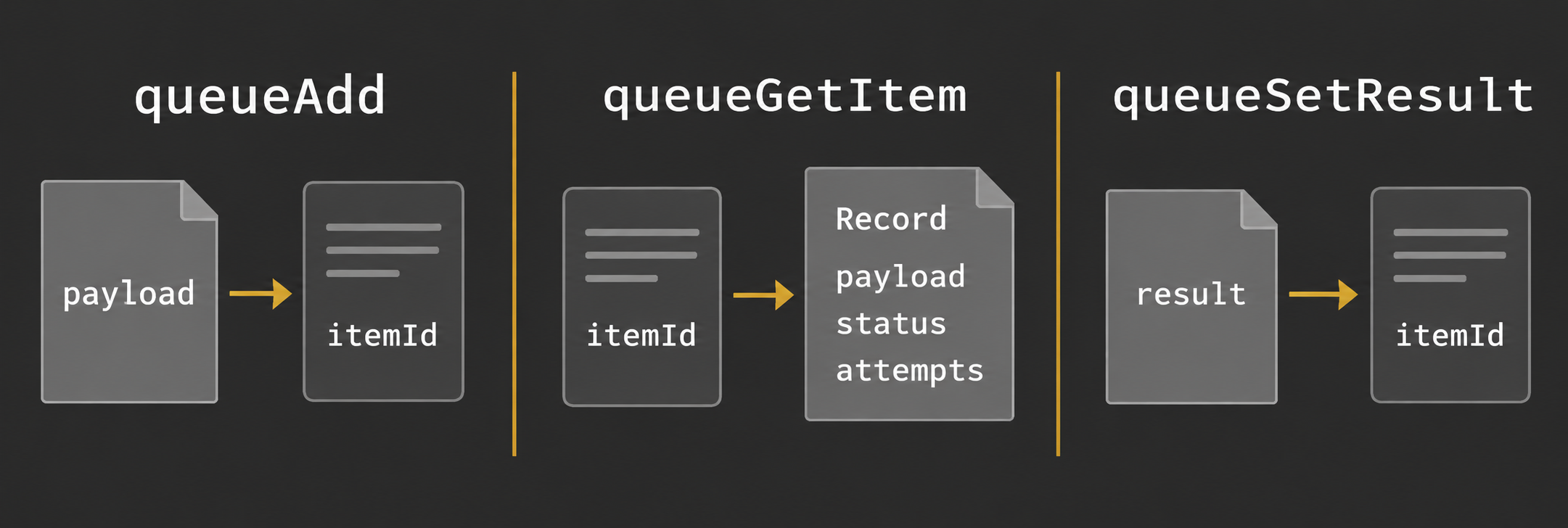
Actions
Add to queue (queueAdd)
Add one item to a room queue and return its ID.
Inputs
| Input | Editor field | Type; default; requirement | Use |
|---|---|---|---|
queue | Queue name | Stringdefault emptyrequired | Name of an existing queue, such as sample-invoices. Not an ID or URL. |
payload | payload | Anydefault no usable valuerequired | A Dictionary or Record, such as $invoice$. Text and List fail. Record columns become keys. Numbers and true/false keep their type. |
priority | priority | Queuedefault Normaloptional | High, Normal or Low sets the item's place in the queue. It does not start a Run. |
Outputs
| Output | Type | Meaning |
|---|---|---|
item | String | Item ID set by the room. Bind it to new for Get work item. The item is not processed yet. |
Example
Prepare invoice as described above. Set queue=sample-invoices, payload=$invoice$, and priority=High. Bind itemId to String variable newItemId.
Expected result
The room stores one item with invoiceNo="INV-9", numeric amount=12.5, and priority High. newItemId holds the ID as text; you cannot predict its value. It fails if the queue does not exist, the content is not valid, the room refuses the item or the request times out.
Get work item (queueGetItem)
Read an item's content, status and attempts. Nothing changes.
Inputs
| Input | Editor field | Type; default; requirement | Use |
|---|---|---|---|
item | Item id | Stringdefault emptyrequired | Item ID as text, a positive whole number such as $new or 7. Spaces around it are allowed. Other values fail. |
Outputs
| Output | Type | Meaning |
|---|---|---|
item | Record | Record with columns payload (Dictionary), status (String), and attempts (Number), in that order. Bind it to work. Values inside the content keep their types. |
Example
After Add to queue, set itemId=$newItemId$. Bind item to Record variable work. If the room reports Active with two attempts for this item, read $work.status$, $work.attempts$, and $work.payload.invoiceNo$.
Expected result
For that illustrative state, status is Active, attempts is Number 2, and invoiceNo is INV-9. The real values come from the room. A missing value reads as an empty Dictionary, an empty String or 0. An invalid ID or a room refusal fails.
Set work item result (queueSetResult)
Store a result Dictionary for the item the room gave to this Run. Items of other Runs fail.
Inputs
| Input | Editor field | Type; default; requirement | Use |
|---|---|---|---|
item | Item id | Stringdefault emptyrequired | Item ID as text, a positive whole number such as 7. Spaces around it are allowed. Other values fail. |
result | result | Dictionarydefault emptyoptional | Result Dictionary, such as {"reference":"OK-1",. Bind a prepared Dictionary to keep the types. Empty stores an empty result. |
Outputs
No output variables.
Example
Use a test Run that the room started for work item 7. Prepare Dictionary outcome with reference=OK-1 (String) and posted=true (Boolean). Set itemId=7 and result=$outcome$.
Expected result
The room stores the result of item 7. The item is not completed. An item not given to this Run, an invalid ID or a server or network error fails.