
Database package guide
Open database sessions, run parameterized statements, manage transactions, and import or export rows.
Version 2.17.1. Installed versions can differ. Examples are illustrative and not tested. See Packages.
Prerequisites
The Device needs a driver for your database: SqlServer, Sqlite, Odbc or OleDb. An ODBC driver must be set up on the Device and match its 32-bit or 64-bit runtime. OLE DB needs Windows and the installed OLE DB driver.
| Database | How to connect |
|---|---|
SQL Server, SQLite, Access (.mdb) | connection, then fill in the fields. |
| Other (MySQL, PostgreSQL, Oracle) | connection with an ODBC or OLE DB connection string. USER refuses them. |
Rules:
- A connection lasts one Run. Its name is a label, not a password. Disconnect before you reuse a name, and at the end.
- After Begin database transaction, all commands of the session join the transaction. Changes not committed are lost at Disconnect.
- The action name does not limit the SQL: a Read from step can delete rows. The database account's permissions decide. Try on a test database first.
- Never paste outside text into SQL. Put values in Parameters. SQL Server and SQLite: write
@idand giveid. ODBC and OLE DB: write?and give the values in the same order. Parameters are values, never table or column names. - A step fails on a SQL error, a timeout, a missing session, empty SQL or no permission.
- A short file path starts in the Run's working folder. In a
DEFAULTconnection string, use full paths.
Sample setup
SQLite examples (session DbLab):
- Create the folder
samples. - Connect with
session=DbLab,connectionMode=USER,databaseProvider=SqLite,sqliteFilePath=samples/guide.db. - With Insert/Update/Delete, run
CREATE TABLE people (id INTEGER, name TEXT). - Run
INSERT INTO people (id, name) VALUES (@id, @name)twice, with parametersid=1, name=Adaandid=2, name=Linus(idNumber,nameString). - Create the Dictionary
personParameters:name=Grace(String),id=3(Number).
Stored procedure examples (session SqlLab):
- Connect with
session=SqlLab,connectionMode=USER,databaseProvider=SQLOLEDB_1,server=database.example.com,database=AutomationSamples. Use your own test server. The Device's account must be allowed to sign in and run procedures. - Create
SampleEchoas shown in Manage stored procedure. - Create the Table
procedureParameterswith these four String columns and two rows, in this order. A JSON object does not work.inOrOutParamteris spelled this way; do not correct it.
| parametername | inOrOutParamter | parametervalue | outputParamType |
|---|---|---|---|
| name | Input | Ada | VARCHAR |
| echo | Output | VARCHAR |
Shared fields
Many actions use these fields. Each action's Inputs part says which.
| Input | Editor field | Type; default; requirement | Use |
|---|---|---|---|
session | Session name | Stringdefault emptyrequired at runtime | The connection name, for example Db. Not empty. Connect creates it; other actions need it open. One transaction uses one session. |
parameters | Parameters for untrusted values | Dictionarydefault emptyoptional | Values for the SQL markers, for example {"id":1} for WHERE id=@id. ODBC and OLE DB fill ? in the order you added the values. |
time | Timeout for the query in seconds | Numberdefault 0optional | Seconds to wait for the SQL. 0 or less: the database default. Not the Connect timeout. |
fetch | Maximum number of records to fetch | Numberdefault 0optional | Most rows to read from the first result. 0 or less reads all. |
do | Export data to CSV | Booleandefault falseoptional | true: also write the rows to CSV. Run stored procedure also needs File Path, or writes nothing. |
file | File Path | Stringdefault emptyoptional | The CSV file, for example samples/. Missing folders are created. CSV uses commas and quotes when needed. Replaced unless append. |
encoding | Encoding | Encodingdefault UTF8optional | ANSI = Windows-1252. UNICODE = UTF-16. UTF8 = UTF-8. |
append | Append to the existing file | Booleandefault falseoptional | true: add to a file that has content. false: replace it. Columns and encoding are not checked. |
| Output | Type | Meaning |
|---|---|---|
result | Table | Rows with the database's column names, typed Number, Boolean, Datetime or String. NULL becomes empty text. In people, $people is Ada. |
Other shared meanings:
query: the SQL, or the procedure name. Not empty. It runs as written. The editor field name differs per action.- Procedure parameters (
entryListin Run stored procedure,parametersin Export to file stream): a Table, for example$procedureParameters$, with columns (any case)parametername,inOrOutParamter,parametervalue,outputParamType. Directions:Input,Output,InputOutput; missing or wrong meansInput. A missing or wrong type meansVARCHAR. An empty input is sent as NULL. Outputs hold up to 4000 characters. Row order is parameter order. Names must not be empty. SQL Server and SQLite add@if missing; ODBC and OLE DB keep names as given. outputParamTypechoices:BIT,TINYINT,SMALLINT,INTEGER,BIGINT,FLOAT,REAL,DOUBLE,NUMERIC,DECIMAL,CHAR,VARCHAR,LONGVARCHAR,DATE,TIME,TIMESTAMP. Inputs go as text; the database converts them.encodingin Export to file stream has the same choices asencodingType.
Actions
Bulk insert (databaseBatchInsert)
Add many rows from a Table or a CSV file to a database table, one parameterized INSERT per row.
Inputs
| Input | Editor field | Type; default; requirement | Use |
|---|---|---|---|
csv | Source file | Stringdefault emptyoptional | A UTF-8 file, for example samples/. Its first row gives the column names. Used only when Source table has no columns. |
source | Source table | Tabledefault emptyoptional | A Table with columns wins over the file, even with zero rows. Example: $new. |
table | Table name | Stringdefault emptyrequired | A table that exists, for example people. Used as one name: dbo.people is not split. Its columns must accept the values as text. |
delimiter | Delimiter | Bulkdefault commaoptional | File only: comma, tab, new (one value per line) or other (Specific delimiter). Quotes work. |
specific | Specific delimiter | Stringdefault emptyoptional | Required for other, for example ; or ::. Otherwise not used. |
csv | Start row number | Numberdefault 2optional | First data row of the file. 2 skips the header. The header is skipped also below 2; above 2 skips more rows. |
column | Columns mapping | Dictionarydefault emptyoptional | Source to table names, for example {"file_. Only listed columns are added. Empty: all columns, same names. |
batch | Batch size | Numberdefault 200optional | Save every N rows. 0 or less saves all at the end. If a later batch fails, earlier batches stay saved. Ignored inside Begin/End database transaction. |
timeout | Timeout (seconds) | Numberdefault 3600optional | Seconds for each INSERT, not the whole import. 0 or less: the database default. |
Also uses the shared fields: session.
Outputs
| Output | Type | Meaning |
|---|---|---|
inserted | Number | The sum of row counts from the database, only on success. Inside a transaction, the rows are not saved yet. |
Example
After the sample setup, create the Table newPeople with String columns id, name and rows (7, Hopper), (8, Turing). Begin a transaction to test all or nothing. Set session=DbLab, sourceTable=$newPeople$, tableName=people, columnMappings={}, batchSize=200, timeoutInSeconds=30. Put inserted in Number insertCount. Commit only after you check it. For a file, leave Source table empty and set csvFilePath=samples/people.csv (header id,name, same rows), delimiter=comma, csvStartRowNumber=2.
Expected result
insertCount is 2. Outside a transaction, a failure undoes only the current batch. Inside one, nothing is saved or undone until you End it. Empty text becomes NULL. Columns with no rows give 0. It fails when no column matches, the file is missing or bad, or a value breaks a rule. Limit: 100,000 rows and 1,000,000 cells from a file.
Begin database transaction (databaseBegin)
Start a transaction. The session's next commands join it until End database transaction.
Inputs
Uses the shared fields: session.
Outputs
None.
Example
After the sample setup, set session=DbLab. Add row 3 with Insert/Update/Delete. End with option=Rollback.
Expected result
The transaction is open. After the rollback, row 3 is gone. If one is already open, the step fails. No nesting or savepoints.
End database transaction (databaseCommit)
Save or undo all commands since Begin.
Inputs
| Input | Editor field | Type; default; requirement | Use |
|---|---|---|---|
option | Option | Enddefault Commitoptional | Commit saves. Rollback undoes. Needs an open transaction, which ends even if this step fails. |
Also uses the shared fields: session.
Outputs
None.
Example
In DbLab, Begin and add (3, Grace). Set session=DbLab, option=Rollback. To keep the row, use option=Commit.
Expected result
Rollback leaves two rows. Commit keeps row 3. With no open transaction, it fails. On a database error, the transaction still ends: check the data before you write more.
Connect (databaseConnect)
Open a database connection under a session name.
Inputs
| Input | Editor field | Type; default; requirement | Use |
|---|---|---|---|
connection | Connection mode | Connectiondefault DEFAULToptional | DEFAULT: you write the connection string and pick the Driver. USER: you fill in Database type and the server or file fields. The other mode's fields are ignored. |
connection | Connection string | Connectiondefault textoptional | DEFAULT only. text: use connection. credential: use the password of connection. |
connection | Connection string | Stringdefault emptyoptional | For DEFAULT with text. SQLite example: Data Source=. Keep secrets in a Credential. |
connection | Connection string credential | Credentialdefault emptyoptional | For DEFAULT with credential: the password holds the whole string; the user name is ignored. Never copy it into a String. |
credential | Database connection parameters | Dictionarydefault emptyoptional | DEFAULT only. Text values added as key=, for example SQLite {"Mode":"Read. Not escaped: follow the driver's rules. |
driver | Driver | Driverdefault Odbcoptional | DEFAULT only: Odbc, Ole, Sql or Sqlite, to match the string. |
use64 | Use ODBC 64-bit driver for connection | Booleandefault falseoptionaleditor: use64 | Not used. Leave as is. Match the ODBC driver to the Device yourself. |
database | Database type | Databasedefault SQLOLEDB_optional | USER only. SQLOLEDB_ = SQL Server. Microsoft_ = Access (Jet OLE DB). Sq = SQLite. MYSQL, Postgre and Oracle fail. |
server | Enter a server name | Stringdefault emptyoptional | USER SQL Server host, for example database.example.com. Instance or Port is added. |
database | Database name | Stringdefault emptyoptional | USER SQL Server database, for example Automation. Empty: the login's default. |
user | User name | Credentialdefault emptyoptional | USER SQL Server login name (the Credential's user name; its password is ignored). Empty: sign in as the Device's Windows account. |
auth | Password | Credentialdefault emptyoptional | The SQL Server password, when User name is set (the Credential's password). It can be the same Credential as User name. |
instance | Instance name | Stringdefault emptyoptional | USER SQL Server instance, for example SAMPLE, added as server\SAMPLE. Port is then ignored. |
timeout | Timeout in seconds | Numberdefault 0optional | USER SQL Server: seconds to wait for the connection. 0 or less: the default. Not the query timeout. |
port | Port | Numberdefault 0optional | USER SQL Server port, for example 1433, only with no Instance. 0 or less: no port. |
db | Database file path | Stringdefault emptyrequired in stated branch | Required for USER Access: the file, for example samples/, readable and writable. The Jet OLE DB driver must be installed and match the 32-bit or 64-bit runtime. |
sqlite | Database file path | Stringdefault emptyrequired in stated branch | Required for USER SQLite, for example samples/. The folder must exist; a missing file is created. |
oracle | Oracle instance | Oracledefault sidoptionaleditor: database | sid, service or tns. Not used: USER has no Oracle. Use a DEFAULT string. |
is | Use specific database | Booleandefault falseoptional | Not supported. Keep false: true always fails. |
file | Driver file | Stringdefault emptyoptionaleditor: is | Not supported: custom driver files cannot load. Leave empty. |
Also uses the shared fields: session.
Outputs
| Output | Type | Meaning |
|---|---|---|
session | String | The session name, for $db. No password or connection string. |
Example
Create the folder samples. Set session=DbLab, connectionMode=USER, databaseProvider=SqLite, sqliteFilePath=samples/guide.db, isUserDefinedDriver=false. Put sessionName in String dbSession. No sign-in is needed.
Expected result
dbSession is DbLab, and the SQLite file is open or created. It fails on an empty name, a missing driver, an unsupported type, wrong settings or no access. A failed connection is not kept.
Manage stored procedure (databaseCreateUpdateDelete)
Run a full command, usually CREATE, ALTER or DROP PROCEDURE. Any SQL runs, as far as the account allows.
Inputs
| Input | Editor field | Type; default; requirement | Use |
|---|---|---|---|
query | Enter full command | Stringdefault emptyrequired | Shared fields. |
Also uses the shared fields: parameters, timeOut, session.
Outputs
| Output | Type | Meaning |
|---|---|---|
rows | Number | The database's count. Commands that create or change objects often give -1; check the object. |
Example
In SqlLab, set session=SqlLab and timeOut=30. Leave Parameters empty and enter this command. Put rowsAffected in ddlCount. Do not test DROP on a real object.
CREATE PROCEDURE SampleEcho
  @name nvarchar(100), @echo nvarchar(100) OUTPUT
AS
BEGIN
  SET NOCOUNT ON;
  SET @echo = @name;
END
Expected result
SampleEcho exists for Run stored procedure. The count can be -1. It fails if the object exists. SQLite has no procedures, but this action can run other SQLite commands, such as creating a test view. Whether a rollback undoes such commands depends on the database.
Disconnect (databaseDisconnect)
Close one connection. An open transaction closes without saving.
Inputs
| Input | Editor field | Type; default; requirement | Use |
|---|---|---|---|
dosave | Keep database schema in cache until bot finishes running | Booleandefault falseoptionaleditor: dosave | Not used. Leave false. Nothing is kept. |
Also uses the shared fields: session.
Outputs
None.
Example
After the DbLab steps, set session=DbLab, dosaveData=false. To save an open transaction, End it with Commit first.
Expected result
The session is gone; changes not committed are lost. Later commands need a new Connect.
Export to data table (databaseExportToDataTable)
Read query rows into a Table. Same as Read from, without CSV.
Inputs
| Input | Editor field | Type; default; requirement | Use |
|---|---|---|---|
query | Enter SELECT Statement | Stringdefault emptyrequired | Shared fields. |
Also uses the shared fields: parameters, fetchSize, timeOut, session.
Outputs
result (Table): see shared fields.
Example
After the sample setup, set session=DbLab, query=SELECT id, name FROM people ORDER BY id, fetchSize=1 and timeOut=30. Leave Parameters empty. Put result in Table peopleRows.
Expected result
The Table has Number column id, String column name and one row (1, Ada). Rows count from 0. No match gives an empty Table with the columns.
Export to file stream (databaseExportToFileStream)
Write query or procedure rows to a CSV file, which is replaced. All rows are held in memory first.
Inputs
| Input | Editor field | Type; default; requirement | Use |
|---|---|---|---|
read | Read from database | Readdefault selectoptional | select: SELECT statement and SELECT parameters. select: Stored procedure name and the Parameters Table. The other fields are ignored. |
select | SELECT statement | Stringdefault emptyoptional | The SQL, for example SELECT id, name FROM people ORDER BY id. Outside values go in SELECT parameters. |
stored | Stored procedure name | Stringdefault emptyoptional | A procedure that exists, for example Sample in SqlLab. SQLite has none. |
parameters | Parameters | Tabledefault emptyoptional | Shared fields. |
query | SELECT parameters for untrusted values | Dictionarydefault emptyoptional | SELECT values, for example {"id":1} with WHERE id=@id. select only. |
time | Timeout in seconds | Numberdefault 0optional | Shared fields. |
file | File name | Stringdefault emptyrequired | The CSV file, for example samples/. Missing folders are created. |
encoding | Encoding | Encodingdefault UTF8optional | As encoding in Shared fields. |
include | Include column headers | Booleandefault falseoptional | true: column names first. false: data only. |
Also uses the shared fields: session, fetchSize.
Outputs
| Output | Type | Meaning |
|---|---|---|
file | Any | The CSV file with its full path. Use it where a file path is needed. Not an open file. |
Example
After the sample setup, set session=DbLab, readFromDatabase=selectStatement, selectStatement=SELECT id, name FROM people ORDER BY id, queryParameters={}, fetchSize=0, timeOut=30, fileName=samples/people-export.csv, encoding=UTF8, includeHeaders=true. Put file in a File variable exportFile. For a procedure, use SqlLab, storedProcedureName=SampleEcho, parameters=$procedureParameters$; its first result can be empty.
Expected result
The file has id,name, 1,Ada and 2,Linus. exportFile has the full path. Zero rows still write the file, with headers if asked and known. A missing file name or no write permission fails. Procedure output values are not returned.
Insert/Update/Delete (databaseInsertUpdateDelete)
Run a command that changes data, or any other command, and get the changed-row count. Use a transaction for changes that belong together.
Inputs
| Input | Editor field | Type; default; requirement | Use |
|---|---|---|---|
query | Statement | Stringdefault emptyrequired | Shared fields. |
Also uses the shared fields: parameters, timeOut, session.
Outputs
| Output | Type | Meaning |
|---|---|---|
rows | Number | Rows changed. Can be -1 for commands that change no rows. Not a success flag. |
Example
After the sample setup, set session=DbLab, query=INSERT INTO people (id, name) VALUES (@id, @name), parameters=$personParameters$, timeOut=30. Put rowsAffected in Number changedRows.
Expected result
changedRows is 1, and id 3 is Grace. UPDATE or DELETE can give 0 when no row matches. A committed DELETE is permanent. A value that breaks a table rule fails.
Read from (databaseSqlQuery)
Read query rows into a Table, and optionally write them to CSV.
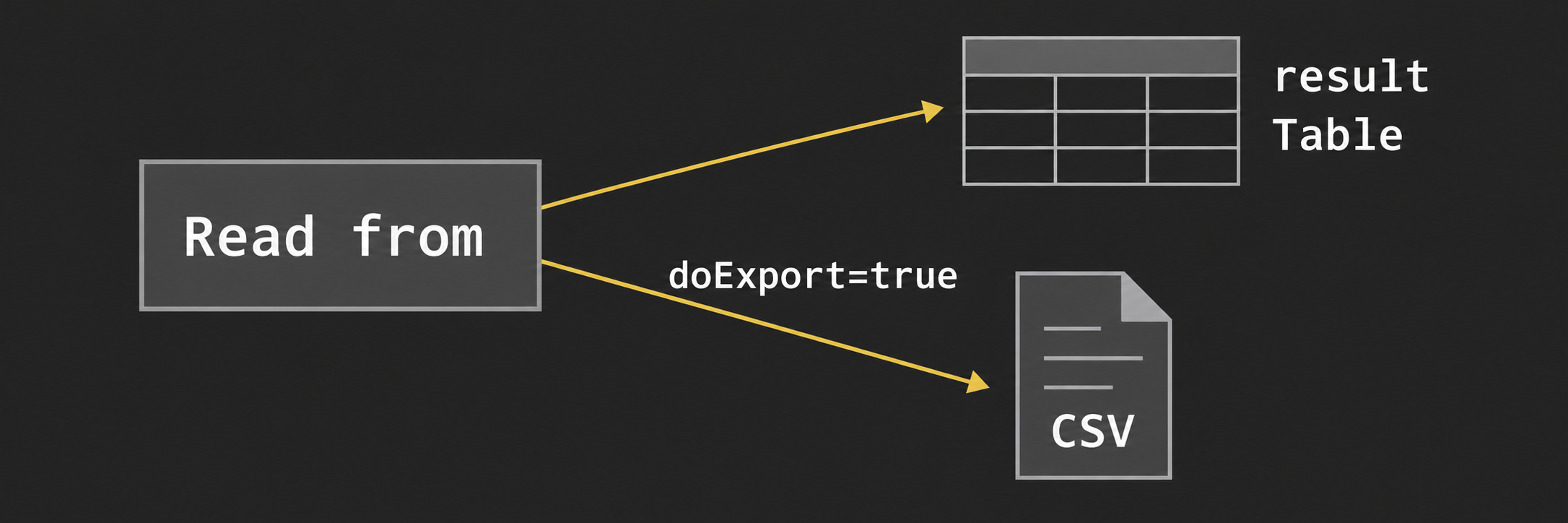
doExport=true, it also writes those rows to CSV. A positive fetchSize limits rows. View full sizeInputs
| Input | Editor field | Type; default; requirement | Use |
|---|---|---|---|
query | Enter SELECT Statement | Stringdefault emptyrequired | Shared fields. |
with | Export data with header | Booleandefault falseoptional | true: column names first, but not again when adding to a file with content. |
no | Don't create file if no data is found | Booleandefault falseoptional | true: zero rows write no file, and an old file stays. false: an empty file can be written. |
Also uses the shared fields: parameters, fetchSize, timeOut, doExport, filePath, encodingType, appendTo, session.
Outputs
result (Table): see shared fields.
Example
Use the Export to data table example, then also set doExport=true, filePath=samples/first-person.csv, encodingType=UTF8, withHeader=true, noBlankCSV=true, appendTo=false.
Expected result
The Table is the same as in Export to data table. The file is replaced and has id,name and 1,Ada. If the file cannot be written, the step fails after the query ran.
Run stored procedure (databaseStore)
Call a procedure and get its output values as a Dictionary. Its rows can go to CSV but are not in the output.
Inputs
| Input | Editor field | Type; default; requirement | Use |
|---|---|---|---|
query | Procedure name | Stringdefault emptyrequired | Shared fields. |
entry | Parameters | Tabledefault emptyoptional | Shared fields. |
with | With header | Booleandefault falseoptional | true: column names first, but not again when adding to a file with content. |
Also uses the shared fields: fetchSize, timeOut, doExport, filePath, encodingType, appendTo, session.
Outputs
| Output | Type | Meaning |
|---|---|---|
result | Dictionary | The output values by name, as text, read after the first result. |
Example
Do the SqlLab sample setup. Set session=SqlLab, query=SampleEcho, entryList=$procedureParameters$, fetchSize=0, timeOut=30, doExport=false. Put result in Dictionary procedureOutputs.
Expected result
$procedureOutputs.echo$ is Ada. Only Output and InputOutput entries come back, by the name you gave. All values are text; NULL is empty text. No outputs give an empty Dictionary. With CSV export on, file access can also fail.