
PDF package guide
Use PDF to read properties, text, form field values and embedded images, or to merge and split documents.
Version 2.17.1. Installed versions can differ. Examples are illustrative and not tested.
Prerequisites
- A Windows Device. No PDF viewer is needed. The Device account must read the source and write the output.
- A relative path starts in the Run folder. A full path is used as you give it. Spaces at the ends of a PDF path are removed.
- Limits: 64 MB and 10,000 pages per PDF, 10,000 pages for a merged PDF, and 16,777,216 characters of extracted text.
- For a protected PDF, give the password in a Credential.
- Page numbers start at 1. There is no OCR and no page-to-image rendering; use the OCR package for scans.
- Use test files under
samples, keep the originals, and keep overwrite off until you want to replace files. An action that writes many files can leave some written after an error. - For a List input, make a List variable of String paths and give the whole variable, e.g.
$documents$.
Shared fields
| Field | Editor field | Type; default; required/optional | Applies to | Use |
|---|---|---|---|---|
file | PDF path | Stringdefault ""required | pdf, pdf, pdf, pdf, pdf | An existing PDF, e.g. samples/. A path of only spaces fails. |
user | User password | Credentialdefault empty Credentialoptional | pdf, pdf, pdf, pdf, pdf, pdf | The PDF password, in the Credential password field. The username is ignored. Leave empty if the PDF is not protected. Merge uses the same password for every file. |
owner | Owner password | Credentialdefault empty Credentialoptional | pdf, pdf, pdf, pdf, pdf, pdf | Another password to open the PDF. Used only if the user password is empty. |
page | Page range | Pagedefault ALLoptional | pdf, pdf | ALL: every page; selected is ignored. SELECTED: the pages in selected. |
selected | Pages (e.g. 1, 3, 5-12) | Stringdefault ""optional | pdf, pdf, pdf | Pages and ranges, e.g. 1, 3, 5-7, split by commas or semicolons. Pages come in the order you write them, each once, and a range always counts up (7-5 gives 5, 6, 7). Pages that do not exist are skipped. The step fails if no page is left or an entry is not a number. |
output | Folder path | Stringdefault ""required | pdf, pdf | Output folder, e.g. samples/. It is created when a file is written. |
file | File prefix | Stringdefault image (Extract image), split (Split)optional | pdf, pdf | Start of each file name, without a folder, e.g. part. _, _ and so on are added. |
overwrite | Overwrite files with the same name (Merge: Overwrite existing file) | Booleandefault falseoptional | pdf, pdf, pdf, pdf | false: the step fails if an output file exists. true: the file is replaced. An action that writes many files can write some before a later name conflict fails the step. |
| Output | Editor field | Type | Applies to | Use |
|---|---|---|---|---|
properties | Assign PDF properties to a dictionary variable | Dictionary | pdf, pdf, pdf, pdf | String title, author, subject, keywords, creator, producer, creation, modified, version; Number pages; Boolean encrypted. Missing text is empty; dates are text. Save it in Dictionary pdf and read e.g. $pdf. |
files | Written image files (Extract image), Written files (Split) | List of File values | pdf, pdf | The files written, in order. It can be empty. |
Actions
Decrypt document (pdfDecryptDocument)
Hidden. Kept only so old steps open. It always fails. The other actions can read protected PDFs.
Inputs
| Input | Editor field | Type; default; required/optional | Use |
|---|---|---|---|
file | PDF path | Stringdefault ""required | Not used. |
user | User/ | Credentialdefault empty Credentialoptional | Not used. |
output | Save the decrypted PDF file as | Stringdefault ""required | Not used. No file is written. |
overwrite | Overwrite files with the same name | Booleandefault falseoptional | Not used. |
Outputs
None.
Example
An old step with filePath=samples/protected.pdf and outputFile=samples/open.pdf.
Expected result
The step fails with Palatine does not write decrypted copies of PDFs, even with the right password. No file is written.
Encrypt document (pdfEncryptDocument)
Hidden. Kept only so old steps open. It always fails.
Inputs
| Input | Editor field | Type; default; required/optional | Use |
|---|---|---|---|
file | PDF path | Stringdefault ""required | Not used. |
user | User password | Credentialdefault empty Credentialoptional | Not used. |
owner | Owner password | Credentialdefault empty Credentialoptional | Not used. |
output | Save encrypted PDF as | Stringdefault ""required | Not used. No file is written. |
overwrite | Overwrite files with the same name | Booleandefault falseoptional | Not used. |
Outputs
None.
Example
An old step with filePath=samples/report.pdf and outputFile=samples/locked.pdf.
Expected result
The step fails with Palatine does not write encrypted PDFs. No file is written.
Extract field (pdfExtractField)
Read the field values of a fillable PDF form. It does not read other page text.
Inputs
Uses the shared fields: filePath, userSecureText, ownerSecureText.
Outputs
| Output | Editor field | Type and use |
|---|---|---|
fields | Save the output to a variable | Dictionary of field names and String values. A text field gives its text, a checkbox true or false, a radio button the chosen value, and a list the chosen values joined by , . Fields inside fields use dots in their names. |
Example
Use samples/form.pdf with a text field customer that holds Sample Company and a checked checkbox approved. Set filePath=samples/form.pdf. Save fields in Dictionary formData.
Expected result
$formData.customer$ is Sample Company and $formData.approved$ is String true. A PDF without a form gives an empty Dictionary. Signature and button fields give empty text.
Extract image (pdfExtractImage)
Save the images inside the chosen pages as image files. It does not turn pages into images.
Inputs
| Input | Editor field | Type; default; required/optional | Use |
|---|---|---|---|
image | Type of image to be converted to | Imagedefault PNGoptional | PNG, TIFF, BMP, JPEG or GIF. WMF, EMF and EXIF are in the list but fail when an image is written. JPEG files end in .jpg. |
jpeg | JPEG quality | Numberdefault 90optional | 1 to 100; other values change to the nearest limit. Only for JPEG. |
image | Image output | Imagedefault RGBoptional | RGB keeps the colors. GRAY makes the image gray. |
resolution | X Resolution(dpi) | Numberdefault 96optional | Horizontal DPI saved in the file. Used only when X and Y are both above 0. It does not change the image size. |
resolution | Y Resolution(dpi) | Numberdefault 96optional | Vertical DPI saved in the file. Same rule as X. |
Also uses the shared fields: filePath, userSecureText, ownerSecureText, pageOption, selectedPages, outputDirectory, filePrefix, overwriteFile.
Outputs
Returns the shared fields: properties, files.
Example
Use samples/pictures.pdf with one image on page 1. Set filePath=samples/pictures.pdf, pageOption=SELECTED, selectedPages=1, imageFileType=PNG, imageColorType=RGB, outputDirectory=samples/images, filePrefix=figure, overwriteFile=false, resolutionX=96, resolutionY=96. Save files in images and properties in pdfInfo.
Expected result
images has the File samples/images/figure_1.png. A PDF with only text gives an empty List and may create no folder. Images the package cannot read are skipped. It fails with an output type that cannot be written, an existing file when overwrite is off, or pages that do not exist.
Extract text (pdfExtractText)
Read the text of the chosen pages into a String and a UTF-8 file. There is no OCR.
Inputs
| Input | Editor field | Type; default; required/optional | Use |
|---|---|---|---|
extract | Text type | Textdefault PLAINoptional | PLAIN: text as stored. STRUCTURED: text in reading order. |
output | Export data to text file | Stringdefault ""optional | Text file, e.g. samples/, written as UTF-8. Required, even though the editor shows it as optional. |
Also uses the shared fields: filePath, userSecureText, ownerSecureText, pageOption, selectedPages, overwriteFile.
Outputs
| Output | Editor field | Type and use |
|---|---|---|
text | Extracted text | String with the text of the chosen pages, also written to output. Up to 16,777,216 characters. |
Also returns the shared fields: properties.
Example
Use a three-page samples/report.pdf with PALATINE PAGE 1, PALATINE PAGE 2 and PALATINE PAGE 3. Set filePath=samples/report.pdf, extractTextType=PLAIN, pageOption=SELECTED, selectedPages=2-3, outputFile=samples/report.txt, overwriteFile=false. Save text in reportText and properties in pdfInfo.
Expected result
The String and the file have the text of pages 2 and 3, with a new line between pages that have text, and nothing from page 1. Spaces depend on the PDF. A scan with no text gives empty text and still writes the file. It fails with an empty output path, no pages left, or an existing file when overwrite is off.
Get property (pdfGetProperty)
Read the document details and page count, e.g. before you extract or split.
Inputs
Uses the shared fields: filePath, userSecureText, ownerSecureText.
Outputs
Returns the shared fields: properties.
Example
Use an unprotected three-page samples/report.pdf with title Training Report. Set filePath=samples/report.pdf and leave both passwords empty. Save properties in Dictionary pdfInfo.
Expected result
$pdfInfo.title$ is Training Report, $pdfInfo.pages$ is 3 and $pdfInfo.encrypted$ is false. It fails with a file that is not a PDF, a wrong password, or a PDF over the limits.
Merge documents (pdfMergeDocument)
Join all pages of two or more PDFs, in List order. One password is used for all files. You cannot choose pages per file.
Inputs
| Input | Editor field | Type; default; required/optional | Use |
|---|---|---|---|
pdf | PDF documents | Listdefault []required | List of two or more PDF paths in merge order, e.g. $documents$ with String items samples/ and samples/. Each file adds all its pages. |
output | Output file path | Stringdefault ""required | Output file, e.g. samples/. Missing folders are created. Use a path that is not one of the sources. |
Also uses the shared fields: userSecureText, ownerSecureText, overwriteFile.
Outputs
| Output | Editor field | Type and use |
|---|---|---|
file | Merged file | File with the full output path. |
Example
Use samples/a.pdf and samples/b.pdf, two pages each, in List documents in that order. Set pdfDocumentList=$documents$, outputFile=samples/merged.pdf, overwriteFile=false. Save file in merged.
Expected result
merged points to a four-page PDF: the pages of a.pdf, then the pages of b.pdf. It fails with fewer than two files, a file that cannot be read, a wrong password, more than 10,000 pages, or an existing output file when overwrite is off.
Split document (pdfSplitDocument)
Split a PDF by page count, chosen pages, blank separator pages or bookmark level. File numbers start at 1.
Inputs
| Input | Editor field | Type; default; required/optional | Use |
|---|---|---|---|
split | Output file creation options | Splitdefault PAGES_optional | PAGES_: groups of pages in a row. SELECTED_: the chosen pages in one PDF. BLANK_: splits at pages with no letters and no images, and drops those pages. BOOKMARK_: a new part at each bookmark of the chosen level; pages before the first bookmark are kept. |
page | Number of pages per extracted PDF | Numberdefault 1optional | Pages per file for PAGES_. Below 1 uses 1. The last file can have fewer pages. |
bookmark | Bookmark Level | Numberdefault 1optional | Bookmark level for BOOKMARK_; 1 is the top. Below 1 uses 1. The step fails if there is no bookmark at that level. |
Also uses the shared fields: filePath, userSecureText, ownerSecureText, selectedPages, outputDirectory, filePrefix, overwriteFile.
Outputs
Returns the shared fields: properties, files.
Example
Use a four-page samples/report.pdf. Set filePath=samples/report.pdf, splitDocumentOptions=PAGES_PER_FILE, pageCountPerFile=2, outputDirectory=samples/parts, filePrefix=part, overwriteFile=false. Save files in parts and properties in pdfInfo.
Expected result
parts has part_1.pdf (pages 1-2) and part_2.pdf (pages 3-4) in samples/parts. SELECTED_PAGES writes one file, in the order you wrote the pages. With blank separators, empty parts are not written, and a PDF of only blank pages gives an empty List. It fails if there is no bookmark at the chosen level or a later file name exists.
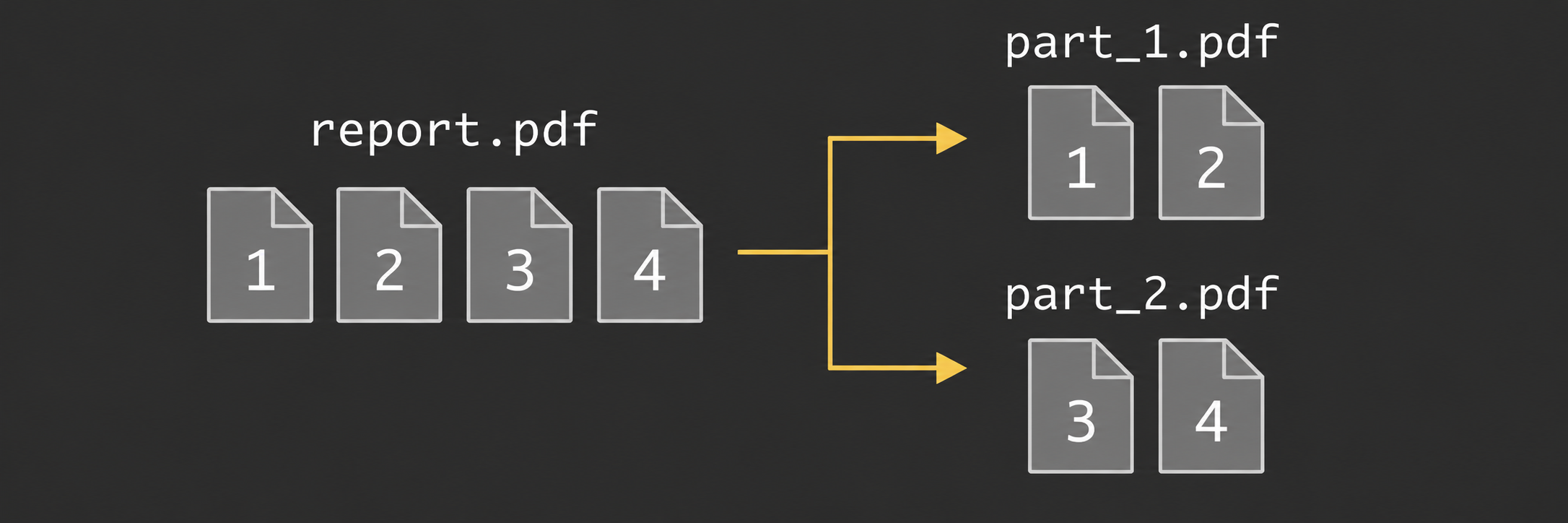
pageCountPerFile=2, each output keeps two consecutive pages. View full size