
PGP package guide
Use PGP to generate OpenPGP keys, encrypt and decrypt files, and create or verify detached signatures.
Version 2.17.1. Installed versions can differ. Examples are illustrative and not tested.
Prerequisites
- Works on local files. No other PGP program is needed.
- The Run account must be able to read the input and key files and write the output. A relative path starts in the Run folder. Missing output folders are created.
- Every action that writes a file replaces an existing file. Never use an input or key path as the output.
- Encrypt holds the file in memory, so large files need enough memory. Encrypted output differs on each Run.
- Use a test
samplesfolder. Generate a sample key pair first, with identityTraining Keyand a Credential variablekeyPasswhose password is entered securely. Key generation, Sign and Decrypt need a password that is not empty. - Keep the private key restricted. Give out only the public key.
The examples form one flow: generate keys, encrypt and decrypt, then sign and verify.
Shared fields
| Field | Editor field | Type; default; required/optional | Use |
|---|---|---|---|
input | Source file | Stringdefault ""required | Existing input file, such as samples/. Full path or relative to the Run folder. |
output | Destination file (Sign: Signature file) | Stringdefault ""required | Output file. It must differ from every input and key file. |
key | Private key file (Decrypt, Sign) or Public key file (Encrypt, Verify) | Stringdefault ""required | Private key (Decrypt, Sign) or public key (Encrypt, Verify), as text or binary. If the file holds several keys, Decrypt uses the key the message was encrypted for, Encrypt and Sign use the first usable key, and Verify uses the signer's key. |
passphrase | Passphrase | Credentialdefault empty Credentialoptional | Credential whose password protects the private key, or the new key in Generate key pair. The username is ignored. An empty password fails. |
armor | ASCII armor the output | Booleandefault trueoptional | true writes text you can open in an editor (armored); false writes binary. Decrypt and Verify read both. |
| Output | Editor field | Type and use |
|---|---|---|
file | Decrypted file, Encrypted file or Signature file | File value with the full path of the file written. |
Actions
Decrypt file (pgpDecrypt)
Decrypt a text or binary OpenPGP message with the matching private key. The action checks that the file was not changed before it writes the output.
Inputs
Uses the shared fields: inputFilePath, outputFilePath, keyFilePath and passphrase.
Outputs
The shared file output (Decrypted file).
Example
First encrypt samples/message.txt with the sample public key. Set inputFilePath=samples/message.pgp, outputFilePath=samples/recovered.txt, keyFilePath=samples/keys/private.asc, passphrase=$keyPass$; bind file to recovered.
Expected result
recovered.txt has the same content as the original message. A wrong password or no matching private key fails. If the file was changed, the action fails and writes nothing.
Encrypt file (pgpEncrypt)
Encrypt a file with the receiver's public key (AES-256). Only the matching private key can open it.
Inputs
Uses the shared fields: inputFilePath, outputFilePath, keyFilePath and armor.
Outputs
The shared file output (Encrypted file).
Example
Use the sample public key from Generate key pair and prepare samples/message.txt containing sample message. Set inputFilePath=samples/message.txt, outputFilePath=samples/message.pgp, keyFilePath=samples/keys/public.asc, armor=true; bind file to encrypted.
Expected result
samples/message.pgp holds an armored encrypted message, not the original text. encrypted is its full File path. A missing input file, or a key file without an encryption key, fails.
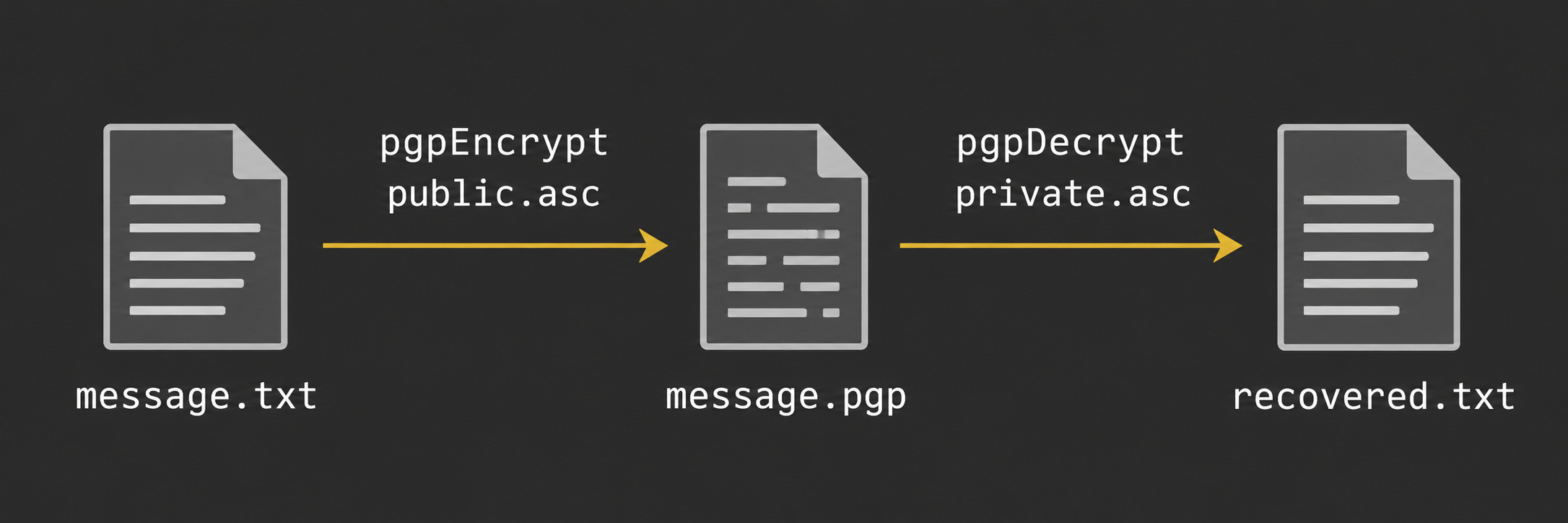
public.asc. Decrypt with the matching private.asc and its passphrase. View full sizeGenerate key pair (pgpGenerateKeys)
Generate an armored RSA OpenPGP key pair. Test with a sample pair before you encrypt or sign real files.
Inputs
| Input | Editor field | Type; default; required/optional | Use |
|---|---|---|---|
identity | Identity | Stringdefault ""optional | Name written into the key, such as Training Key. Must not be empty, although the editor does not mark it required. It shows in the Run log. |
key | Key size | Numberdefault 2048optional | RSA size in bits, at least 2048. Use 2048 for the sample pair. |
public | Public key file | Stringdefault ""required | Output for the public key, such as samples/. Use a different path from the private key. |
private | Private key file | Stringdefault ""required | Output for the password-protected private key, such as samples/. Restrict access to this file. |
Also uses the shared fields: passphrase.
Outputs
| Output | Editor field | Type and use |
|---|---|---|
public | Public key file | File value with the full path of the public key file. |
private | Private key file | File value with the full path of the private key file. |
Example
Create Credential variable keyPass with a sample password that is not empty, entered securely. Set identity=Training Key, passphrase=$keyPass$, keySize=2048, publicKeyFilePath=samples/keys/public.asc, privateKeyFilePath=samples/keys/private.asc. Bind outputs to publicKey and privateKey.
Expected result
The public file starts with -----BEGIN PGP PUBLIC KEY BLOCK-----; the private file starts with -----BEGIN PGP PRIVATE KEY BLOCK-----. An empty identity or password, or a key size below 2048, fails before any key is made.
Sign file (pgpSign)
Write a separate signature file (SHA-256) for the whole file. The file does not change.
Inputs
Uses the shared fields: inputFilePath, outputFilePath, keyFilePath, passphrase and armor.
Outputs
The shared file output (Signature file).
Example
Prepare samples/message.txt and the sample private key. Set inputFilePath=samples/message.txt, outputFilePath=samples/message.sig, keyFilePath=samples/keys/private.asc, passphrase=$keyPass$, armor=true; bind file to signature.
Expected result
message.sig starts with -----BEGIN PGP SIGNATURE-----. A wrong password or a key file without a signing key fails.
Verify signature (pgpVerify)
Check that the file matches its signature and that the signer's key is still valid. Only the first signature in the signature file is checked.
Inputs
| Input | Editor field | Type; default; required/optional | Use |
|---|---|---|---|
signature | Signature file | Stringdefault ""required | Existing signature file, text or binary, made for exactly this file. |
Also uses the shared fields: inputFilePath and keyFilePath.
Outputs
| Output | Editor field | Type and use |
|---|---|---|
result | Assign the output to an existing variable | Boolean, for use in a branch. true means the file matches the signature and the key is valid. |
Example
Sign samples/message.txt with the sample pair first. Set inputFilePath=samples/message.txt, signatureFilePath=samples/message.sig, keyFilePath=samples/keys/public.asc; bind result to Boolean valid.
Expected result
valid=true for the unchanged file and a valid key. A changed file, an unknown signer, or a key that is expired, revoked or dated in the future gives false. A missing or damaged file fails instead of giving false. true does not prove who owns the key.