
Regex package guide
Use Regex to locate patterns in text, extract full matches and capture groups, replace matches, and evaluate a match condition.
Version 2.17.1. Installed versions can differ. Examples are illustrative and not tested. Packages.
Prerequisites
Write the pattern as you would in .NET, for example \d+ (not \\d+). A wrong pattern fails the step, and so does a search that takes more than 5 seconds. Case rules do not depend on the Device language. Line endings in the text are not changed. Write true and false in lowercase.
Sample text for the examples: a1 b22 c333. The pattern \d+ finds 1, 22 and 333.
Shared fields
regexExpandregexPattern: the pattern, such as\d+(one or more digits).theTextandinputString: the text to search, or a String variable such as$documentText$. A file name is searched as text; read the file first.caseInsensitiveworks likeignoreCasein Match Regex. Its Multiline and Dot switches have the same meaning as the shared switches.
Match switches
| ID | Editor field | Type; default; requirement | Use |
|---|---|---|---|
ignore | Ignore case | Booleandefault falseoptional | true ignores case; false keeps it, unless the pattern changes it. |
multiline | Multiline (^ and $ match every line) | Booleandefault falseoptional | true makes ^ and $ match each line. It does not change .. |
dot | Dot matches newline | Booleandefault falseoptional | true lets . match LF too. It does not change ^ or $. |
Actions
Extract All Matches (regexExtractAllMatches)
Return every match with its text, place and number.
Inputs
Also uses the match switches.
| ID | Editor field | Type; default; requirement | Use |
|---|---|---|---|
regex | Regex Pattern with Matches | Stringdefault ""required | Shared |
the | Input Text | Stringdefault ""required | Shared |
Outputs
| ID | Type | Meaning |
|---|---|---|
result | List | List of Dictionaries: String match, Number start (position from 0, counted in UTF-16 code units), Number end (the first position after the match), Number position (match number from 1). |
Example
Set regexExp=\d+, theText=a1 b22 c333, and all three switches false. Save result in matches.
Expected result
matches is [{"match":"1","start":1,"end":2,"position":1},{"match":"22","start":4,"end":6,"position":2},{"match":"333","start":8,"end":11,"position":3}]. So $matches[1].match$ is 22. No match gives []. Empty matches are kept.
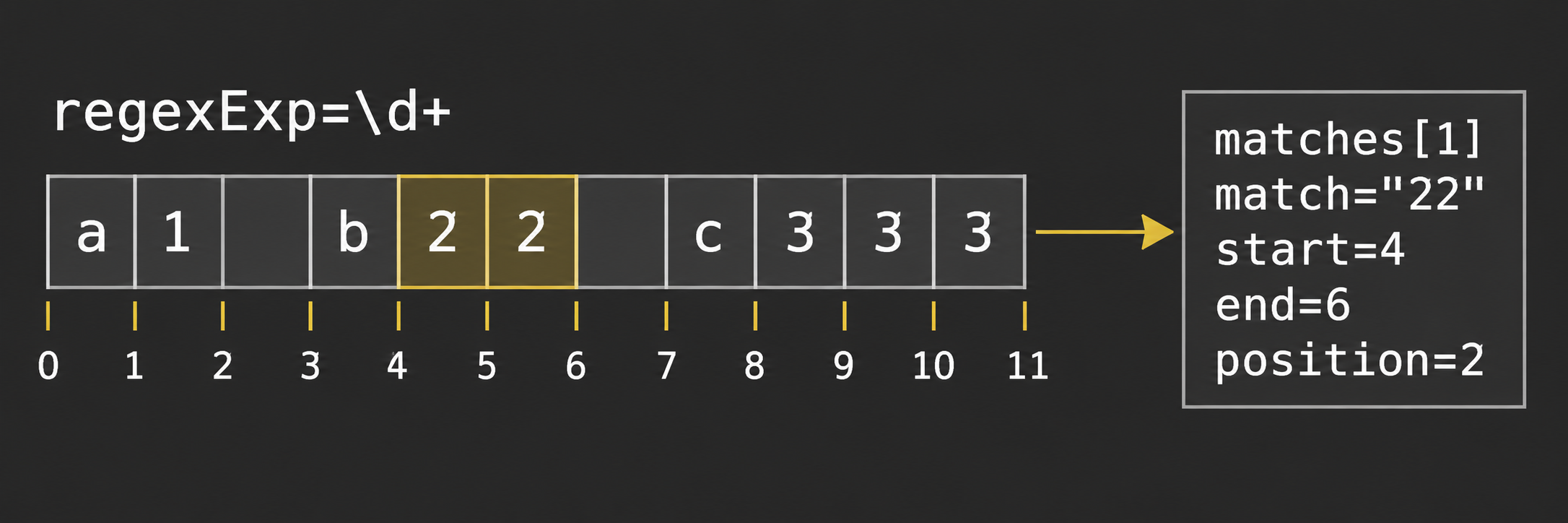
0; match order starts at 1. The end offset is excluded. View full sizeExtract a Regex Match (regexExtractMatch)
Return one full match.
Inputs
Also uses the match switches.
| ID | Editor field | Type; default; requirement | Use |
|---|---|---|---|
regex | Regex Pattern with Matches | Stringdefault ""required | Shared |
match | Match Number to Extract | Numberdefault 1optional | Match number, from 1 to the match count. It picks a full match, not a group. |
the | Input Text | Stringdefault ""required | Shared |
Outputs
| ID | Type | Meaning |
|---|---|---|
result | String | Selected full match text. |
Example
Set regexExp=\d+, matchNumber=3, theText=a1 b22 c333, and all three switches false. Save result in thirdMatch.
Expected result
thirdMatch is 333. A match number that does not exist (here 0 or 4) fails. So does no match at all.
Get Number of Matches (regexGetNumberOfMatches)
Count all matches without returning their text.
Inputs
Also uses the match switches.
| ID | Editor field | Type; default; requirement | Use |
|---|---|---|---|
regex | Regex Pattern with Matches | Stringdefault ""required | Shared |
the | Input Text | Stringdefault ""required | Shared |
Outputs
| ID | Type | Meaning |
|---|---|---|
result | Number | Number of full matches, empty matches included. |
Example
Set regexExp=\d+, theText=a1 b22 c333, and all three switches false. Save result in matchCount.
Expected result
matchCount is 3. Text abc gives 0. Pattern ^x against two lines containing x gives 2 with multiline=true. Pattern a.b against a, LF, b gives 1 with dotAll=true.
Match Regex (regexMatch)
Return full matches, unnamed groups and named groups. Each output List has one entry per kept match.
Inputs
| ID | Editor field | Type; default; requirement | Use |
|---|---|---|---|
input | Input text | Stringdefault ""required | Shared |
regex | Regular expression pattern | Stringdefault ""required | (\w) makes an unnamed group; (?< makes the named group digit. See Shared fields. |
match | Match scope | Matchdefault FIND_optional | FIND_: all matches. FIND_: the first match kept after blank matches are skipped. |
case | Case insensitive | Booleandefault falseoptional | Switches |
multiline | Multiline mode | Booleandefault falseoptional | Switches |
dot | Dot matches all (DOTALL) | Booleandefault falseoptional | Switches |
unicode | Unicode-aware case folding (UNICODE_CASE) | Booleandefault falseoptionalshown when unicode | Old setting, kept for older steps and shown only when it is true. It does nothing: Unicode case matching is already built in. |
comments | Permit whitespace and comments in pattern (COMMENTS) | Booleandefault falseoptional | true ignores unescaped white space in the pattern and lets # start a comment to the line end. To match a space or #, escape it or put it in [ ]. The text itself is not changed. |
trim | Trim whitespace from matches and groups | Booleandefault falseoptional | true trims white space from each match and group before blank matches are skipped. |
include | Include iterations for empty/blank full matches | Booleandefault falseoptional | false skips full matches that are empty or only white space. true keeps them and their groups. |
named | Named groups to extract (Optional) | Listdefault []optional | List of String group names, such as digit. Text such as digit, or names split by commas or lines, also works. Empty gives all named groups. Names keep case; an unknown name gives an empty value. |
Outputs
| ID | Type | Meaning |
|---|---|---|
full | List | List of full-match Strings, after trimming and skipping; example variable full. |
numbered | List | List of Lists of Strings: unnamed groups only, in numeric order, without group 0 and named groups; example variable numbered. |
named | List | List of Dictionaries of Strings, one key per selected group name; example variable named. $named[0].digit$ reads 1 in the example. |
Example
Set inputString=a1 b2, regexPattern=(\w)(?<digit>\d), and matchScope=FIND_ALL. Leave switches false and namedGroupsToExtract empty. Store the three outputs in List variables full, numbered, and named.
Expected result
full is ["a1","b2"]; numbered is [["a"],["b"]]; named is [{"digit":"1"},{"digit":"2"}]. With FIND_FIRST, each output keeps only its first entry. No kept match gives [] in all outputs. An optional group that did not match, or an unknown name, gives an empty String.
Replace based on Regex (regexReplace)
Replace every match. The replacement uses .NET syntax, so $1 inserts group 1.
Inputs
Also uses the match switches.
| ID | Editor field | Type; default; requirement | Use |
|---|---|---|---|
the | Input Text | Stringdefault ""required | Shared |
regex | Regex Pattern | Stringdefault ""required | Shared |
to | Replace With | Stringdefault ""optional | Replacement text; $1 inserts group 1. Variables are filled in first: $name$ and ${name} become the value of a variable with that name, and $$ becomes one $. $1 has no closing $, so it stays literal even if variable 1 exists. $1$ and ${group} can resolve variables. For a literal $ in the result, write $$$$. |
Outputs
| ID | Type | Meaning |
|---|---|---|
result | String | Complete text after all replacements. |
Example
Set theText=a1 b22 c333, regexExp=(\d+), toReplaceWith=[$1], and all three switches false. Save result in marked.
Expected result
marked is a[1] b[22] c[333]. With no match, the text comes back unchanged. An empty replacement removes the matches.
Conditions
Regex match is found (regexMatchIsFound)
True if there is at least one match.
Inputs
Also uses the match switches.
| ID | Editor field | Type; default; requirement | Use |
|---|---|---|---|
regex | Regex Pattern with Matches | Stringdefault ""required | Shared |
the | Input Text | Stringdefault ""required | Shared |
Outputs
No output. True or false picks the branch.
Example
Set regexExp=\d+, theText=a1 b22 c333, and all three switches false.
Expected result
The condition is true. With theText=abc, it is false. A pattern that matches an empty place is also true. A wrong pattern or a timeout fails; it does not give false.