
Data Table package guide
Work with typed tables: create, inspect, clean, combine, change, and export rows and columns.
Version 2.13.2. Installed versions can differ. Examples are illustrative and not tested.
Prerequisites
The actions work in memory, with no spreadsheet application or session. To export, the account of the Run needs write access. result → x means: save the output in variable x. Fields not marked required are optional, and an empty field uses the default in the table. A column or row that does not exist, or a position out of range, fails the step.
Use a Table variable for a table input: text that looks like CSV is not a Table. Use a Record variable for a Record input. A List input takes a List variable or an array such as ["a","b"]. For an Any field, use a typed variable when the column type matters: a value typed in the field has type Any. To put a Number in text, write $number|string$.
A table input allows at most 100,000 rows, 1,000,000 cells and 16,777,216 characters. A result can be larger. In cleanup actions, "spaces" also means tabs and other whitespace.
Sample data:
- Save the CSV below as
samples/orders.csv. - Open it with CSV/TXT Open (
session=orders,containsHeader=true,delimeter=comma). - Read it with the same session into Table
$orders$, then Close. All columns are String. - For a Record input, loop over the rows of the table and save the first row as
$person$(id=A1,name=Ada,qty=2).
Each example starts from this table. Do not chain examples that remove data. Make the other tables in the examples the same way, with the headers and rows given.
id,name,qty
A1,Ada,2
A2,Bea,10
Shared fields
Actions link here for the fields they use.
| ID | Field | Type; default; requirement | Use |
|---|---|---|---|
table | Data table name (also Select Data Table, Enter datatable name) | Tabledefault empty Tablerequired | Your table. |
input | Base table (also Base Table, Input Data Table, Table, Input Table variable) | Tabledefault empty Tablerequired | Your table. |
column | column | Stringdefault "" | Column header, such as name. Exact case first (see column selection). |
column | column (also Column index) | Numberdefault 0 | Column position, starting at 0. |
col | Column name | Stringdefault "" | Column header, such as name. case sets the case rule. |
col | Column index | Numberdefault 0 | Column position, starting at 0. |
case | Case-sensitive comparison | Booleandefault false | true: exact case. false: case is ignored. Spaces are never trimmed. |
row | Row by index (also Row index) | Numberdefault 0 | Row position, starting at 0, such as 0 for the first row. The row must exist. |
Column selection
Pick a column by NAME (its header, such as name) or by INDEX (its position, starting at 0). Only the field for your choice is used. A column that does not exist fails the step (Table has columns returns a Boolean instead). Exact case first: an exact match wins, else case is ignored. Extract table columns takes the first match with case ignored.
Typed values: only the value field of the selected columnType is used. Number: type 2.5 or use a Number variable. Datetime: type 2026-10-15T09:00:00Z or use a Datetime variable with the offset you want. Boolean: type true or use a Boolean variable.
Count comparison
The count of the table is compared with your number. The count includes every column or row, also empty ones.
| ID | Field | Type; default; requirement | Use |
|---|---|---|---|
condition | Comparison | Comparisondefault EQ | One code from the table below. |
| Code | Editor label | Means |
|---|---|---|
LT | Less than (<) | less than |
LTQ | Less or equal to (≤) | less than or equal |
EQ | Equals to (=) | equal |
GTE | Greater or equal to (≥) | greater than or equal |
GT | Greater than (>) | greater than |
NEQ | Not equal to (≠) | not equal |
Export formats
Write to file and Write to file stream share these fields. CSV export puts quotes around delimiters, quotes and line breaks. It puts an apostrophe before text that starts with =, +, - or @ (after any spaces or tabs), so a formula does not run. This changes such values.
| ID | Field | Type; default; requirement | Use |
|---|---|---|---|
row | Row delimiter | Delimiterdefault NEW_ | A delimiter from the table below. |
other | Delimiter | Stringdefault "" | Only with row: a separator that is not empty, such as ;. It can have more than one character. |
column | Column delimiter | Delimiterdefault COMMA | A delimiter from the table below. |
other | Delimiter | Stringdefault "" | Only with column: a separator that is not empty. It can have more than one character. |
encoding | Encoding | Encodingdefault UTF_ | An encoding from the table below. |
| Delimiter | Writes |
|---|---|
COMMA | , |
SEMI_ | ; |
COLON | : |
TAB | a tab |
NEW_ | a line feed (LF) |
OTHER | the text in the matching other-delimiter field |
| Encoding | Writes |
|---|---|
ansi | Windows-1252 |
UTF_ | UTF-8 without a byte order mark |
UTF_ | UTF-8 with a byte order mark |
UTF_ | UTF-16 little-endian without a byte order mark |
unicode | UTF-16 little-endian with a byte order mark |
win1251 | Windows-1251 |
SHIFT_ | code page 932 |
Date formats
Change column type reads dates in one of these forms when formatType=preBuilt. A zone name in brackets is removed, and its rules are not applied.
| Format | Example or form |
|---|---|
BASIC_ | 20261015 |
ISO_ | 2026-10-15 |
ISO_ | date with offset, such as 2026-10-15+02:00 |
ISO_ | date, offset optional |
ISO_ | local date and time, such as 2026-10-15 |
ISO_ | date and time with offset, such as 2026-10-15 |
ISO_ | date and time with offset and an optional zone in brackets |
ISO_ | local date and time, or with offset |
ISO_ | 2026-288 |
ISO_ | 2026-W42-4 |
ISO_ | date and time with offset |
RFC_ | Thu, 15 Oct 2026 00:00:00 GMT |
Table outputs
| ID | Type | Editor field |
|---|---|---|
result | Table | Assign modified table to, Save the outcome to a variable, Assign reversed table to or Assign sliced table to, by action. |
table | Table | Data table name, or Enter datatable name in Sort. |
Actions
Add column (dataTableAddColumn)
Add a column from one repeated value or from a List, such as a status per row.
Inputs
Uses shared fields: inputTable.
| ID | Field | Type; default; requirement | Use |
|---|---|---|---|
col | Column name | Stringdefault "" | New header, such as status. Empty: Column and the new position, starting at 1. Duplicate headers are allowed. |
insert | Add column | Insertdefault END | END: add at the end. INDEX: insert at item. |
item | Enter item position index | Numberdefault 0 | Only with insert: position from 0 to the column count. |
insert | Column value | Columndefault DEFAULT | DEFAULT: repeat default. LIST: one item of column per row. A longer list adds rows; a shorter list leaves the other new cells empty. |
default | Default value | Anydefault empty String | Only with insert: a typed value, such as String $status$ that contains new. Its type becomes the column type. |
column | Column values | Listdefault [] | Only with insert: a List or JSON array, such as ["new",. If all items have one type, the column has that type, else String. |
Outputs
Uses table outputs: result.
Example
Set inputTable=$orders$, colName=status, insertType=END, insertMethod=LIST, columnValues=["new","hold"]. result → $tagged$.
Expected result
$tagged$ has headers id,name,qty,status and rows A1,Ada,2,new and A2,Bea,10,hold. An empty table with a List of values gets new rows.
Assign (dataTableAssign)
Copy a Table, or make an empty table of a fixed size.
Inputs
| ID | Field | Type; default; requirement | Use |
|---|---|---|---|
option | Source data table | Optiondefault table | table: copy source. resize: an empty table of row rows and column columns. |
source | source | Tabledefault empty Table | Only with option=: the table to copy, such as $orders$. |
row | Number of rows | Numberdefault 1 | Only with option=: number of rows, more than 0. |
column | Number of columns | Numberdefault 1 | Only with option=: number of columns, more than 0. Names: Column1, Column2 and so on. |
Outputs
Uses table outputs: result.
Example
Set option=resize, rowSize=2, columnSize=3. result → $grid$. To copy instead, set option=table, sourceTable=$orders$.
Expected result
$grid$ has String columns Column1, Column2, Column3 and two rows of empty text. A size of 0 or less fails. A copy keeps the columns and rows of the source.
Change column type (dataTableChangeColumnType)
Convert every cell of a column, and the column type, before you sort numbers or calculate with dates.
Inputs
Uses shared fields: table, columnName, columnIndex.
| ID | Field | Type; default; requirement | Use |
|---|---|---|---|
change | Select column by | Changedefault NAME | NAME or INDEX. See column selection. |
change | Select the new column data type | Changedefault String | String: keep the text. Number: numbers with a dot for decimals, such as 2.5. Boolean: true or false. Datetime: the date format you select. Empty cells stay empty. |
format | Select date time format | Formatdefault pre | Only with change: pre uses pre; custom uses custom. |
pre | pre | Predefault ISO_ | Only with format: one of the date formats. |
custom | custom | Stringdefault "" | Only with format: a date pattern such as dd/, with English month and day names. A cell that does not match fails the conversion. |
Outputs
Uses table outputs: result.
Example
Set table=$orders$, changeOptions=NAME, columnName=qty, changeType=Number. result → $numericOrders$.
Expected result
qty is a Number column with values 2 and 10. The other columns do not change. A cell such as two fails the conversion.
Clear content (dataTableClearContent)
Remove all rows and keep the columns.
Inputs
Uses shared fields: table.
Outputs
Uses table outputs: table.
Example
Set table=$orders$. Output table → $cleared$.
Expected result
$cleared$ has headers id,name,qty and no rows. An empty table keeps its columns.
Convert Column To List (dataTableConvertColumnToList)
Get the cells of one column as a List, for a loop over names or IDs.
Inputs
Uses shared fields: inputTable, colName, caseSensitive, colIndex.
| ID | Field | Type; default; requirement | Use |
|---|---|---|---|
select | Select column by | Selectdefault NAME | NAME or INDEX. See column selection. |
Outputs
| ID | Type | Result | Editor field |
|---|---|---|---|
result | List | The column values, in row order. | Assign column values to |
Example
Set inputTable=$orders$, selectMethod=NAME, colName=name, caseSensitive=false. result → $names$.
Expected result
$names$ is ["Ada","Bea"]. A table with no rows gives []. A row that is too short gives empty text.
Convert Header To List (dataTableConvertHeaderToList)
Get the headers as a List, with optional trimming.
Inputs
Uses shared fields: inputTable.
| ID | Field | Type; default; requirement | Use |
|---|---|---|---|
is | Trim leading and trailing whitespace | Booleandefault false | true: trim the spaces at the ends of the returned headers. The table does not change. |
Outputs
| ID | Type | Result | Editor field |
|---|---|---|---|
result | List | The headers in column order. | Assign headers list to |
Example
Set inputTable=$orders$, isStrip=true. result → $headers$.
Expected result
$headers$ is ["id","name","qty"]. A table with no columns gives [].
Convert Table To Dictionary (dataTableConvertToDictionary)
Make a Dictionary from a key column and a value column, for lookups. If a key repeats, the later row wins.
Inputs
Uses shared fields: inputTable.
| ID | Field | Type; default; requirement | Use |
|---|---|---|---|
key | Select key column by | Selectdefault NAME | NAME or INDEX for the key column. See column selection. |
key | Key column name | Stringdefault "" | Header of the key column. |
key | Case-sensitive comparison | Booleandefault false | Case rule for key, as for case in shared fields. |
key | Key column index | Numberdefault 0 | Position of the key column, starting at 0. |
value | Select value column by | Selectdefault NAME | NAME or INDEX for the value column. |
value | Value column name | Stringdefault "" | Header of the value column. |
value | Case-sensitive comparison | Booleandefault false | Case rule for value. |
val | Value column index | Numberdefault 0 | Position of the value column, starting at 0. |
Outputs
| ID | Type | Result | Editor field |
|---|---|---|---|
result | Dictionary | Key text to value. If a key repeats, the later row wins. | Assign dictionary to |
Example
Set inputTable=$orders$, keySelectMethod=NAME, keyColNameInput=id, valueSelectMethod=NAME, valueColNameInput=name. result → $namesById$.
Expected result
$namesById$ is {"A1":"Ada","A2":"Bea"}. Keys keep their case and must match exactly. An empty table gives {}.
Convert Table To HTML (dataTableConvertToHtml)
Make HTML for a table, or for a full page. Keep escaping on for cell text you do not trust.
Inputs
Uses shared fields: inputTable.
| ID | Field | Type; default; requirement | Use |
|---|---|---|---|
include | Include table header (< | Booleandefault true | true: headers in <. false: body rows only. |
table | Table ID | Stringdefault "" | HTML id, such as orders. Empty: no id. Attributes are always escaped. |
table | Table CSS Class(es) | Listdefault [] | CSS classes, such as ["grid",, joined with spaces. No stylesheet is added. |
table | Table Caption | Stringdefault "" | Caption above the table, always escaped. Empty: no caption. |
enable | Enable Inline Styling | Booleandefault false | true: use the CSS in the style fields below, such as padding:8px. An empty style field adds nothing. false: the style fields are ignored. An even or odd row style replaces the default row style. |
table | < | Stringdefault "" | The table. |
thead | < | Stringdefault "" | The header group. |
tbody | < | Stringdefault "" | The body group. |
th | < | Stringdefault "" | Each header cell. |
tr | Default < | Stringdefault "" | The header row, and body rows with no even or odd style. |
tr | Even < | Stringdefault "" | Body rows at positions 0, 2, 4 and so on. |
tr | Odd < | Stringdefault "" | Body rows at positions 1, 3, 5 and so on. |
td | < | Stringdefault "" | Each body cell. |
escape | Escape HTML in cell data | Booleandefault true | true: headers and cells are escaped, so < becomes &. false: raw HTML, only for content you trust. |
generate | Generate complete HTML page | Booleandefault false | true: a full HTML page. false: only the table. |
custom | Page Title | Stringdefault "" | Only with generate: the page title, escaped. |
additional | Additional < | Stringdefault "" | For a full page: raw HTML for <, not escaped. Use only content you trust. Can be empty. |
Outputs
| ID | Type | Result | Editor field |
|---|---|---|---|
result | String | The HTML text. | Assign HTML to |
Example
Set inputTable=$orders$, includeHeader=true, tableId=orders, tableCaption=Orders, escapeHtmlInCells=true, generateCompleteHtmlPage=false. Leave the style fields empty. result → $html$.
Expected result
$html$ has a <table id="orders">, the caption Orders, three header cells and two body rows. No file is written and no CSS is loaded. An empty table still gives table HTML.
Set schema (dataTableCopySchema)
Replace or extend the columns of a table with the columns of a Record or another table. Rows keep their cells by position. No rows are copied and no values are converted.
Inputs
Uses shared fields: inputTable.
| ID | Field | Type; default; requirement | Use |
|---|---|---|---|
select | Source of schema | Schemadefault record | record: columns from input. table: columns from input. |
input | Source record | Recorddefault empty Record | Only with select. Its values are not copied. |
input | Source table | Tabledefault empty Table | Only with select. Its rows are not copied. |
updatecriteria | Update method | Schemadefault overwrite_ | overwrite_: replace the columns. append_: add the source columns at the end. Extra cells are cut and missing cells are empty. |
Outputs
Uses table outputs: result.
Example
Set selectMethod=record, inputRecord=$person$, inputTable=$orders$, updatecriteria=overwrite_schema. result → $reshaped$.
Expected result
$reshaped$ keeps the two rows and gets columns id,name,qty from the Record. Fewer new columns cut the last cells; more columns add empty cells. Adding an empty set of columns adds nothing.
Delete column (dataTableDeleteColumn)
Remove a column and its cells.
Inputs
Uses shared fields: table, columnName, columnIndex.
| ID | Field | Type; default; requirement | Use |
|---|---|---|---|
selected | selected | Selecteddefault name | name: use column. index: use column. |
Outputs
Uses table outputs: table.
Example
Set table=$orders$, selectedType=name, columnName=qty. Output table → $withoutQty$.
Expected result
$withoutQty$ has headers id,name and rows A1,Ada and A2,Bea.
Delete row (dataTableDeleteRow)
Remove one row by its position. Test on sample data first.
Inputs
Uses shared fields: table.
| ID | Field | Type; default; requirement | Use |
|---|---|---|---|
input | Delete row at index | Numberdefault 0 | Position of an existing row, starting at 0. The row count is not a valid position. |
Outputs
Uses table outputs: table.
Example
Set table=$orders$, inputPosition=0. Output table → $remaining$.
Expected result
$remaining$ has only A2,Bea,10, with the same columns. An empty table fails.
Get column name (dataTableGetColumnName)
Get a header by its column position.
Inputs
Uses shared fields: table, columnIndex.
Outputs
| ID | Type | Result | Editor field |
|---|---|---|---|
column | String | The header. | Assign column name to variable |
Example
Set table=$orders$, columnIndex=1. columnName → $header$.
Expected result
$header$ is name. Here a position other than 0 to 2 fails. An empty header gives empty text.
Get number of columns (dataTableGetNumberOfColumns)
Count all columns, or only columns with content.
Inputs
Uses shared fields: table.
| ID | Field | Type; default; requirement | Use |
|---|---|---|---|
column | column | Columndefault total | total: all columns. non: columns with at least one cell that is not empty. A cell with only spaces counts as not empty. |
Outputs
| ID | Type | Result | Editor field |
|---|---|---|---|
result | Number | The count. | Assign result to variable |
Example
Set table=$orders$, columnCountSelection=totalColumnSelection. result → $width$.
Expected result
$width$ is 3. With no rows, the total still counts the columns, and the content count is 0.
Get number of rows (dataTableGetNumberOfRows)
Count all rows, or only rows with content.
Inputs
Uses shared fields: table.
| ID | Field | Type; default; requirement | Use |
|---|---|---|---|
row | row | Rowdefault total | total: all rows. non: rows with at least one cell that is not empty. A cell with only spaces counts as not empty. |
Outputs
| ID | Type | Result | Editor field |
|---|---|---|---|
result | Number | The count. | Assign result to variable |
Example
Set table=$orders$, rowCountSelection=totalRowSelection. result → $height$.
Expected result
$height$ is 2. An empty table gives 0.
Insert column (dataTableInsertColumn)
Insert a new typed column, or copy a column from another table.
Inputs
| ID | Field | Type; default; requirement | Use |
|---|---|---|---|
to | Destination table | Tabledefault empty Tablerequired | The table that gets the column. Its rows and columns stay. |
position | Insert column at index | Positiondefault last | first: at the start. last: at the end. specific: at specific. |
specific | specific | Numberdefault 0 | Only with position: position from 0 to the column count. |
insert | Insert column | Insertdefault custom | custom: a new typed column with one default value in each row. source: copy a column from from. |
from | Enter data from | Tabledefault empty Table | Only with insert: the table with the column to copy. |
select | select | Selecteddefault name | Only with source: name uses from, index uses from. |
from | from | Stringdefault "" | Header of the column to copy. Exact case first. |
from | from | Numberdefault 0 | Position of the column to copy, starting at 0. |
custom | Column name | Stringdefault "" | Only with custom: the header, such as status. Empty: Column and the new position, starting at 1. |
column | Column type | Columndefault String | String, Number, Boolean or Datetime. Only the matching default value is used (see typed values). |
default | Default value | Stringdefault "" | Only with column: such as new, or a String variable. |
default | Default value | Numberdefault 0 | Only with column. |
default | Default value | Datetimedefault 0001-01-01T00:00:00+00:00 | Only with column. |
default | Default value | Booleandefault false | Only with column. |
Outputs
| ID | Type | Result | Editor field |
|---|---|---|---|
to | Table | The table with the new or copied column. | Destination table |
Example
Set toTable=$orders$, positionSelected=lastPosition, insertColumnSelection=custom, customColumnName=approved, columnType=Boolean, defaultValueBoolean=false. toTable → $review$.
Expected result
$review$ has a fourth Boolean column approved, with false in both rows. A custom column adds no rows to an empty table. Copying uses the larger row count; missing cells are empty text.
Insert row (dataTableInsertRow)
Insert a Record as a row. Cells go to the columns with the same header.
Inputs
Uses shared fields: table.
| ID | Field | Type; default; requirement | Use |
|---|---|---|---|
position | Insert row at index | Positiondefault last | first: at the start. last: at the end. specific: at input. |
input | input | Numberdefault 0 | Position starting at 0. The row count is allowed (the end). |
row | Row record name | Recorddefault empty Record | The Record to insert. Headers match with exact case first. For each header with no match, use the cell at the same position if both have the same number of columns, else empty text. |
Outputs
Uses table outputs: table.
Example
Set table=$orders$, positionSelection=lastPosition, rowRecord=$person$. Output table → $extended$.
Expected result
$extended$ has three rows: A1,Ada,2 is added at the end. A table with no columns takes the columns of the Record. Cells with no match are empty text. A position after the row count fails.
Join (dataTableJoin)
Add data from a second table where the key cells have the same text. The result keeps all columns of both tables, also both key columns.
Inputs
| ID | Field | Type; default; requirement | Use |
|---|---|---|---|
first | Enter first data table name | Tabledefault empty Tablerequired | The left table, such as $orders$. |
first | Enter column name for first table | Stringdefault "" | Key header, such as id. Exact case first. Key cells must match with exact case. |
second | Enter second data table name | Tabledefault empty Tablerequired | The right table. |
second | Enter column name for second table | Stringdefault "" | Key header, such as id. Exact case first. Key cells must match with exact case. |
join | Select type of join | Joindefault INNER_ | INNER_: only matches. LEFT_: also left rows with no match. RIGHT_: also right rows with no match. OUTER_: also rows with no match from both sides. Cells of the missing side are empty text. |
Outputs
| ID | Type | Result | Editor field |
|---|---|---|---|
joined | Table | All columns of both tables and the joined rows. | Enter name of data table in which to join |
Example
Make $cities$ with String headers id,city and rows A1,Lima and A3,Cusco. Set firstTable=$orders$, firstColumnName=id, secondTable=$cities$, secondColumnName=id, joinType=LEFT_JOIN. joinedTable → $joined$.
Expected result
$joined$ has headers id,name,qty,id,city. The first row is A1,Ada,2,A1,Lima. The second row is A2,Bea,10 and two empty cells. A key that repeats gives one row for each matching pair.
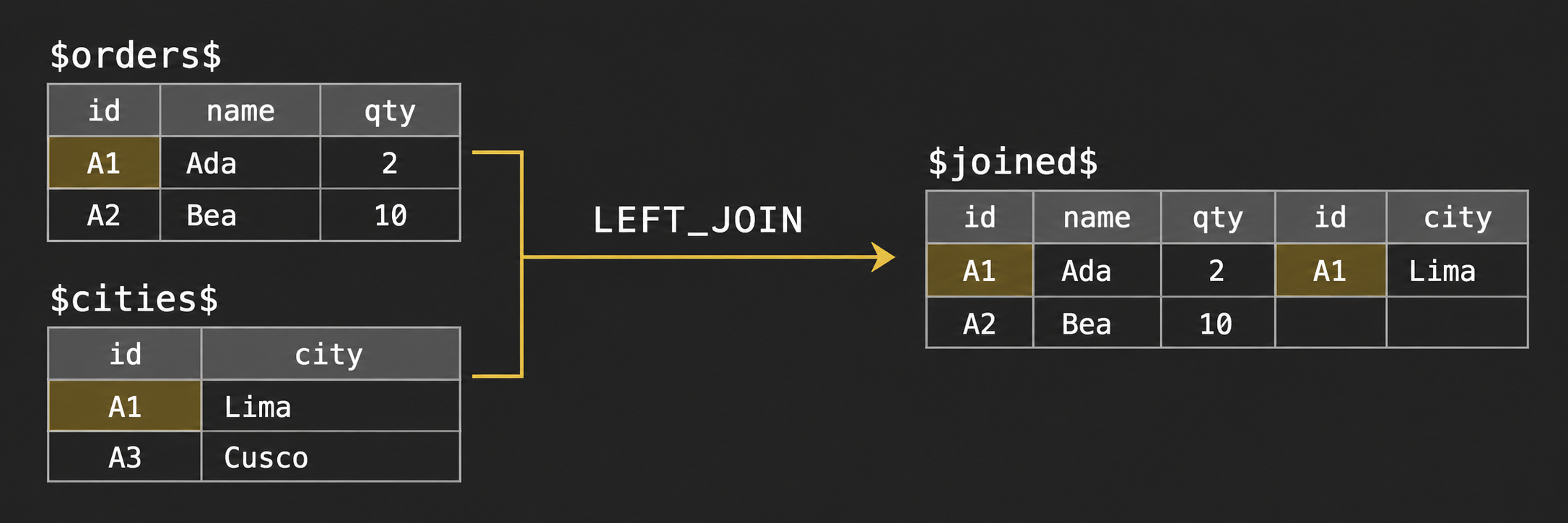
LEFT_JOIN keeps both left rows and both key columns. Missing right-side values become empty Strings. View full sizeMerge (dataTableMerge)
Add the rows of a second table after the first. The headers must have the same names, order and case.
Inputs
| ID | Field | Type; default; requirement | Use |
|---|---|---|---|
first | Enter first data table name | Tabledefault empty Tablerequired | Its rows come first. |
second | Enter second data table name | Tabledefault empty Tablerequired | Its rows come after the first table. |
Outputs
| ID | Type | Result | Editor field |
|---|---|---|---|
merged | Table | The columns of the first table, its rows, then the rows of the second. | Enter name of the data table in which to merge |
Example
Set firstDataTable=$orders$, secondDataTable=$orders$. mergedTable → $combined$.
Expected result
$combined$ has four rows: the two rows twice. Different headers fail. The column types need not match, and no cell is converted.
Normalize headers (dataTableNormalizeHeaders)
Clean up the spaces and case of the headers before actions that use header names.
Inputs
Uses shared fields: inputTable.
| ID | Field | Type; default; requirement | Use |
|---|---|---|---|
normalize | Normalize whitespace | Booleandefault false | true: change each run of spaces to one space and trim the ends. Runs first. |
remove | Remove all whitespace | Booleandefault false | true: remove all spaces from the headers. Runs second. |
convert | Convert case | Convertdefault NONE | NONE: keep the case. LOWERCASE or UPPERCASE. Runs last. |
Outputs
Uses table outputs: result.
Example
Make a Table $messy$ with header First Name and one cell Ada. Set inputTable=$messy$, normalizeSpaces=true, removeAllWhitespace=false, convertCase=LOWERCASE. result → $normalized$.
Expected result
The header becomes first name and the cell stays Ada. The action can make two headers the same and does not fix that. Case conversion does not use the Device language.
Remove duplicate rows (dataTableRemoveDuplicateRows)
Keep the first of each set of rows that have the same text in all cells.
Inputs
Uses shared fields: table.
Outputs
Uses table outputs: table.
Example
First merge $orders$ with itself into $combined$. Set table=$combined$. Output table → $unique$.
Expected result
$unique$ has the two original rows, in their order. Rows that differ only in case stay. Cells are joined with the character U+001F to compare rows, so two rows whose cells contain that character can be seen as equal.
Remove empty columns (dataTableRemoveEmptyColumns)
Remove columns where every cell is empty or only spaces.
Inputs
Uses shared fields: inputTable.
Outputs
Uses table outputs: result.
Example
Make $sparse$ with headers a,b and rows x, and ,. Set inputTable=$sparse$. result → $compactColumns$.
Expected result
Only column a stays, with cells x and empty text. A table with no rows loses all its columns.
Remove empty rows (dataTableRemoveEmptyRows)
Remove rows where every cell is empty or only spaces. Note that the row count in Get number of rows counts a row with only spaces.
Inputs
Uses shared fields: inputTable.
Outputs
Uses table outputs: result.
Example
Make $sparse$ with headers a,b and rows x, and ,. Set inputTable=$sparse$. result → $compactRows$.
Expected result
Both headers stay and only row x, stays. Cells such as 0 and false are content and keep their row.
Reverse table (dataTableReverseRowOrder)
Reverse the order of the rows, so the last row comes first. No sorting, and the columns do not change.
Inputs
Uses shared fields: inputTable.
Outputs
Uses table outputs: result.
Example
Set inputTable=$orders$. result → $reversed$.
Expected result
The rows are A2,Bea,10 then A1,Ada,2.
Search for a value (dataTableSearchForAValue)
Find every cell whose full text is the value.
Inputs
Uses shared fields: table.
| ID | Field | Type; default; requirement | Use |
|---|---|---|---|
value | Enter value to search for | Anydefault empty Stringrequired | The value to find. The full cell text must match, not a part of it. |
match | Match case | Booleandefault false | true: exact case. false: case is ignored. |
Outputs
| ID | Type | Result | Editor field |
|---|---|---|---|
result | List | One row, text for each match, positions starting at 0. | Assign result to variable |
Example
Set table=$orders$, value=Ada, matchCase=true. result → $hits$.
Expected result
$hits$ is ["0,1"]. No match gives []. Ad does not match Ada.
Set value of a single cell (dataTableSetCellValue)
Replace one cell. The text is read as the type of the column, so a Number or Boolean column keeps its type.
Inputs
Uses shared fields: table, rowPosition, columnName, columnIndex.
| ID | Field | Type; default; requirement | Use |
|---|---|---|---|
column | Column by | Celldefault col | col: use column. col: use column. |
value | Set value of table cell | Stringdefault "" | New text, read as the column type: Ana (String), 3.5 (Number), true in lowercase (Boolean). |
Outputs
Uses table outputs: table.
Example
Set table=$orders$, rowPosition=0, columnType=colName, columnName=name, value=Ana. Output table → $corrected$.
Expected result
The first row is A1,Ana,2. Text that is not valid for the column type fails. An empty value gives an empty String cell, also in a Number or Boolean column.
Set row as header (dataTableSetRowAsHeader)
Use a row as the headers, and remove it if you want. All columns become String.
Inputs
Uses shared fields: inputTable, rowPosition.
| ID | Field | Type; default; requirement | Use |
|---|---|---|---|
is | Remove row from table | Booleandefault true | true: remove the row. false: keep it as data. |
Outputs
Uses table outputs: result.
Example
Set inputTable=$orders$, rowPosition=0, isRowToBeRemoved=true. result → $promoted$.
Expected result
The headers are A1,Ada,2, and only row A2,Bea,10 stays. Other cells are not converted. Empty or repeated cells give empty or repeated headers.
Extract table columns (dataTableSliceColumns)
Keep only some columns, in the order you give, for example before an export.
Inputs
Uses shared fields: inputTable.
| ID | Field | Type; default; requirement | Use |
|---|---|---|---|
select | Select columns by | Columndefault INDEX_ | INDEX_: use index. COLUMN_: use column. |
index | Column indexes | Listdefault [] | Only with INDEX_: positions starting at 0, such as [0,. Order and repeats are kept. |
column | Column names | Listdefault [] | Only with COLUMN_: headers in output order, such as ["name",. The first match with case ignored wins: with Name,, name gives Name. |
Outputs
Uses table outputs: result.
Example
Set inputTable=$orders$, selectMethod=COLUMN_NAMES, columnNameList=["name","id"]. result → $selected$.
Expected result
The headers are name,id, with rows Ada,A1 and Bea,A2. An empty List gives no columns but keeps the row count.
Extract table rows (dataTableSliceRows)
Keep a range of rows (end not included) or a List of rows.
Inputs
Uses shared fields: inputTable.
| ID | Field | Type; default; requirement | Use |
|---|---|---|---|
select | Select rows by | Rowdefault RANGE | RANGE: from start to end, end not included. INDEX_: use index. |
start | Start row index | Numberdefault 0 | Only with RANGE: first row, from 0 to the row count. |
end | End row index | Numberdefault 0 | Only with RANGE: the row after the last, from the start to the row count. |
index | Row indexes | Listdefault [] | Only with INDEX_: positions starting at 0, such as [0,. Order and repeats are kept. |
Outputs
Uses table outputs: result.
Example
Set inputTable=$orders$, selectMethod=RANGE, startRowIndex=0, endRowIndex=1. result → $firstOnly$.
Expected result
$firstOnly$ has only A1,Ada,2. The same start and end give an empty table with the same columns. An end before the start fails.
Sort (dataTableSort)
Sort the rows by one column, using its column type: text in character-code order, or Number order.
Inputs
Uses shared fields: table, columnName, columnIndex.
| ID | Field | Type; default; requirement | Use |
|---|---|---|---|
sort | Sort by column | Changedefault NAME | NAME or INDEX. See column selection. |
sort | Select the order in which to sort | Sortdefault ASCENDING | ASCENDING or DESCENDING. Rows with equal values keep their order. |
Outputs
Uses table outputs: table.
Example
First use Change column type on qty with changeType=Number, into $numericOrders$. Set table=$numericOrders$, sortOptions=NAME, columnName=qty, sortType=DESCENDING. Output table → $sorted$.
Expected result
The rows are A2,Bea,10 then A1,Ada,2. In a Number, Boolean or date column, an empty or invalid cell has no value and comes before valid values in ascending order.
Trim headers (dataTableTrimSchema)
Trim the spaces at the ends of the headers. Spaces inside and the cells do not change.
Inputs
Uses shared fields: inputTable.
Outputs
Uses table outputs: result.
Example
Make $messy$ with header First Name and cell Ada. Set inputTable=$messy$. result → $trimmed$.
Expected result
The header is First Name, with its two inside spaces. Trimming can make two headers the same.
Update cell (dataTableUpdateCell)
Replace one cell with a typed value. Its type becomes the column type, and the other cells are not converted.
Inputs
Uses shared fields: inputTable, colName, caseSensitive, colIndex.
| ID | Field | Type; default; requirement | Use |
|---|---|---|---|
select | Select column by | Selectdefault NAME | NAME or INDEX. See column selection. |
row | Row index | Numberdefault 0 | Position of an existing row, starting at 0. |
new | New value of cell | Anydefault empty String | A typed value, such as String $replacement$ that contains Ana. |
Outputs
Uses table outputs: result.
Example
Make String variable $replacement$ with value Ana. Set inputTable=$orders$, selectMethod=NAME, colName=name, rowIndex=0, newValue=$replacement$. result → $updated$.
Expected result
The first name is Ana, the second is still Bea, and the name column is String. To convert all cells of a column, use Change column type.
Write to file (dataTableWriteToFile)
Write the rows to a delimited file. Replace the file or add to it. Test with a sample file first.
Inputs
Uses the export formats: rowDelimiter, otherRowDelimiter, columnDelimiter, otherColumnDelimiter, encoding.
| ID | Field | Type; default; requirement | Use |
|---|---|---|---|
source | Data table name | Tabledefault empty Tablerequired | The table to write, such as $orders$. |
file | Enter file name | Stringdefault ""required | Path such as samples/. A relative path starts at the working folder of the Run. |
create | Create folders/ | Booleandefault false | true: create missing parent folders. false: the parent folders must exist. A new file is made in both cases. |
append | When writing | Appenddefault overwrite | overwrite: replace the file and write the header. append: add the rows. A file with content gets no new header and no line break before the new rows. A new or empty file gets a header. |
Outputs
None. The result is the file.
Example
Set sourceTable=$orders$, filePath=samples/export.csv, createDirectories=true, appendToExistingFile=overwrite, rowDelimiter=NEW_LINE, columnDelimiter=COMMA, encoding=UTF_8_WITHOUT_BOM.
Expected result
The file has id,name,qty\nA1,Ada,2\nA2,Bea,10\n, with LF line breaks and no byte order mark. A folder or access error fails the step.
Write to file stream (dataTableWriteToFileStream)
Write a full delimited file and return its full path as text. Parent folders are created and an existing file is replaced.
Inputs
Uses the export formats: rowDelimiter, otherRowDelimiter, columnDelimiter, otherColumnDelimiter, encoding.
| ID | Field | Type; default; requirement | Use |
|---|---|---|---|
source | Data table name | Tabledefault empty Tablerequired | The table to write, such as $orders$. |
file | File name | Stringdefault ""required | Path such as samples/. A relative path starts at the working folder of the Run. |
Outputs
| ID | Type | Result | Editor field |
|---|---|---|---|
file | String | The full path of the file on the Device. | Assign file to a variable |
Example
Set sourceTable=$orders$, fileName=samples/stream-export.csv, rowDelimiter=NEW_LINE, columnDelimiter=COMMA, encoding=UTF_8_WITHOUT_BOM. file → $exportPath$.
Expected result
$exportPath$ is the full path of the file, ending in samples/stream-export.csv with the path separators of the Device. The file has one header and the two rows, each with LF at the end. A permission error fails the step.
Conditions
Table column count (dataTableColumnCondition)
Compare the number of columns, also empty ones, with a number.
Inputs
Uses shared fields: table, and the count comparison: condition.
| ID | Field | Type; default; requirement | Use |
|---|---|---|---|
column | Value | Numberdefault 0 | The number to compare with, such as 2. |
Outputs
No outputs. Use it in an If step.
Example
Set table=$orders$, condition=EQ, columnCount=3.
Expected result
The condition is true: the table has three columns. With columnCount=2, it is false. A table with no columns has count 0.
Table has columns (dataTableHasColumns)
Check that all the headers you list are in the table. Does not include is true when at least one is missing.
Inputs
Uses shared fields: inputTable, caseSensitive.
| ID | Field | Type; default; requirement | Use |
|---|---|---|---|
conditiontype | Condition | Containsdefault CONTAINS | CONTAINS (Includes): all headers are there. NOTCONTAINS (Does not include): the opposite. |
column | Column names | Listdefault []required | Headers, such as ["id",. An empty List counts as all present. |
Outputs
No outputs. Use it in an If step.
Example
Set inputTable=$orders$, conditiontype=CONTAINS, columnNames=["id","name"], caseSensitive=false.
Expected result
The condition is true. Add missing to the List and it is false; NOTCONTAINS then gives true. An older step with a single column name still opens as this condition, but its old colName is not read: set columnNames.
Table row count (dataTableRowCondition)
Compare the number of rows, also empty ones, with a number.
Inputs
Uses shared fields: table, and the count comparison: condition.
| ID | Field | Type; default; requirement | Use |
|---|---|---|---|
row | Value | Numberdefault 0 | The number to compare with, such as 2. |
Outputs
No outputs. Use it in an If step.
Example
Set table=$orders$, condition=GT, rowCount=0.
Expected result
The condition is true for the two rows. An empty table gives false. Use EQ with 0 to find an empty table.
Table headers are blank (dataTableSchemaBlank)
Test whether all headers are blank, or at least one is not. Cells are ignored.
Inputs
Uses shared fields: inputTable.
| ID | Field | Type; default; requirement | Use |
|---|---|---|---|
conditiontype | Condition | Blankdefault ALL_ | ALL_: all headers are empty or only spaces, also when there are no columns. ANY_: the opposite. |
Outputs
No outputs. Use it in an If step.
Example
Set inputTable=$orders$, conditiontype=ANY_HEADER_NOT_BLANK.
Expected result
The condition is true. ALL_HEADERS_BLANK gives false. A table with no columns gives true for ALL_HEADERS_BLANK and false for ANY_HEADER_NOT_BLANK.