
Email package guide
Read, move, save and send email from an automation.
Version 2.17.1. Installed versions can differ. Examples are illustrative and not tested.
Prerequisites
What you need
- An IMAP mailbox to read mail and an SMTP server to send it. Outlook, EWS and POP3 are listed choices, but they always fail. No mail app or browser is used.
- A server that allows your account, protocol and sign-in method, and write access to the mailbox.
- Credential variables for the account, not account names as text.
- For OAuth, a token you already have. The package does not sign in for you and does not refresh tokens.
Keep SSL/TLS on. To turn it off, the server must be on your private network and you must set Allow insecure transport. Only SMTP without sign-in can run without TLS and without that option.
Connect settings
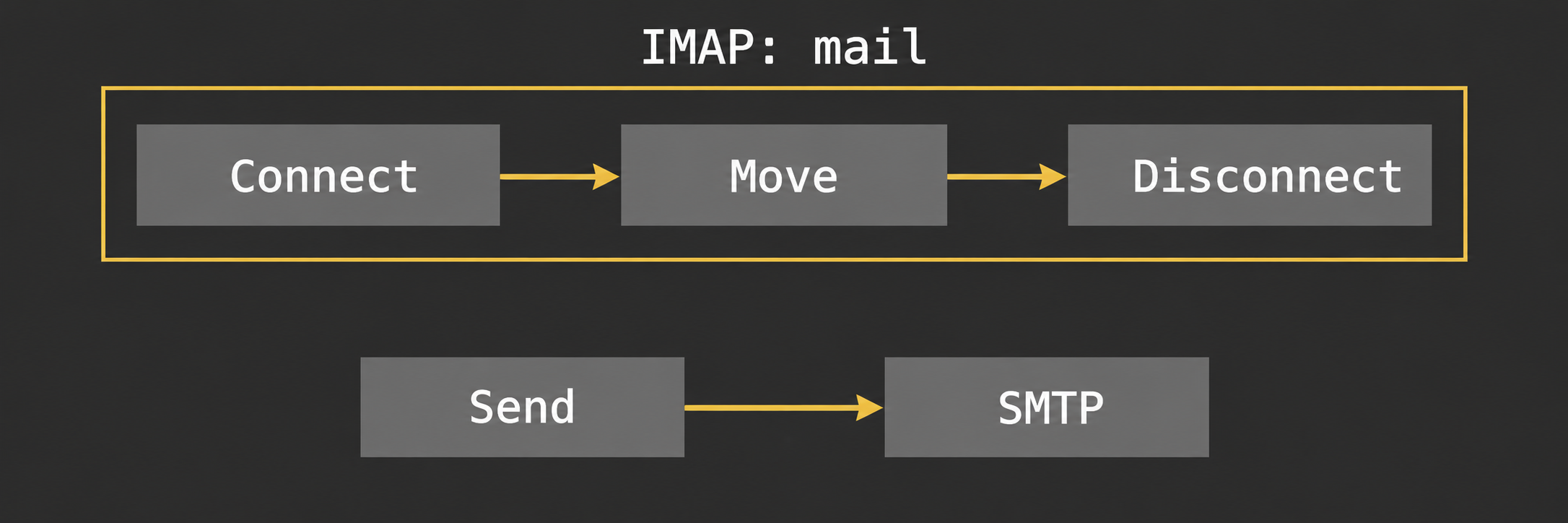
Connect opens a named IMAP session for the current Run. Use these values in the examples:
| Name in editor | Value |
|---|---|
| Session name | mail |
| Connect to | EMAIL_ |
| Host | imap.example.com |
| Port | 993 |
| Protocol | IMAP |
| Use secure connection(SSL/TLS) | true |
| Username | A Credential whose username is the test account. |
| Password | A Credential whose password is the account password. It can be the same Credential as Username. |
Use Session name=mail in the later mailbox actions, then Disconnect.
Send settings
Forward, Reply, Reply All and Send open their own SMTP connection. They need these fields even after Connect. Use these values in the examples:
| Name in editor | Value |
|---|---|
| Send email via | EMAIL_ |
| Email server host | smtp.example.com |
| Email server port | 587 |
| Use secure connection (SSL/TLS) | true |
| From address | A sender test mailbox that the account may send from. |
| My server requires authentication | true if the server needs sign-in. Then bind Username and Password to the test account Credentials. |
Test mailbox
- Create the folders
INBOX,ArchiveandDeleteSamplesin a test mailbox. - Put a message with subject
Invoice sampleand attachmentinvoice.txtinINBOX. - Message id is the message's number in its folder (IMAP UID), for example
42. It is not the sequence number or theMessage-IDheader. Leave it blank to use the newest message. There is no action to list messages, so get the UID from the test mailbox. - For attachments, create
samples/invoice.txtwith the textInvoice sampleand a List variableattachmentsthat holds this path. BindAttachment=$attachments$. A relative local path starts in the Run folder.
Examples use session mail, message 42 and the Send settings above.
Shared fields
A field is optional unless its table says required. These tables hold the fields that many actions use. An action that uses them says so under its Inputs.
Message selection
| Field ID | Name in editor | Type; default | Use |
|---|---|---|---|
folder | Folder | Stringdefault INBOX | The mailbox folder that holds the message. Blank means INBOX. Use / between folder levels. |
message | Message id (IMAP UID) | Stringdefault empty | The message number (IMAP UID) as text, for example 42. Blank uses the newest message in the folder; an empty folder then fails. Zero, a negative value or text that is not a whole number fails. The server can reject a valid number that does not exist, or make no change. |
Filters
A message must match all the filters you fill. A blank filter is not used.
| Field ID | Name in editor | Type; default | Use |
|---|---|---|---|
from | From specific senders | Stringdefault empty | Sender text, with entries separated by semicolons or commas. A message matches if its From contains any entry. |
since | When received date is on or after | Datetimedefault unset | First received date, included, for example 2026-10-01. Only the calendar date (UTC) is compared, not the time. |
before | When received date is before | Datetimedefault unset | Received date to stop before, not included, for example 2026-11-01. Use a date later than the one in since. |
Sign-in
| Field ID | Name in editor | Type; default | Use |
|---|---|---|---|
allow | Allow insecure transport to a private server | Booleandefault false | true allows IMAP without TLS, or SMTP sign-in without TLS, only to a server whose addresses are private or local. It does not turn off certificate checks. |
email | Authentication mode | Maildefault Basic | Basic: user name and password. Any other choice: user name and an OAuth token you already have. The action does not sign in for you. Choices: Basic, auth, client, EMAIL_, SEND_, OAuth2, Interactive. |
username | Username | Credentialdefault empty | A Credential variable. Its username part is the IMAP or SMTP login, also for OAuth. Its password part is not used here. |
secured | Password | Credentialdefault empty | A Credential variable whose password part is the account password for Basic. Its username part is not used. |
Message fields
A successful send means the mail server accepted the message. It does not prove delivery.
| Field ID | Name in editor | Type; default | Use |
|---|---|---|---|
cc | cc | Stringdefault empty | More visible recipients, separated by semicolons or commas. Invalid entries are skipped, except in Send with Raise error if the email ids are invalid set to true. |
bcc | bcc | Stringdefault empty | Hidden recipients, separated by semicolons or commas. Invalid entries follow the cc rule. |
reply | Reply To | Stringdefault empty | Addresses that get the replies to the new message, separated by semicolons or commas. It does not change which message is answered. |
file | Attachment | Listdefault empty | A List variable of local file paths, such as $attachments$. A relative path starts in the Run folder. A typed list, or text with paths separated by commas or new lines, also works; use a List for a path that has a comma. |
ensure | Raise error if the attachments are missing | Booleandefault false | true fails before sending when an attachment is missing. With false, missing files are left out. |
importance | Importance | Maildefault Normal | The importance mark of the message. Choices: High, Normal, Low. |
body | Email body | Bodydefault PLAINTEXT | PLAINTEXT sends Message as text. HTML sends Message as HTML code. HTMLEDITOR is not supported and fails. Choices: PLAINTEXT, HTMLEDITOR, HTML. |
message | Message | Stringdefault empty | The body, for example Invoice sample attached, or HTML such as < with Email body HTML. Replies add the quoted original below this text. |
html | HTML design message | Dictionarydefault empty | Not supported. Leave empty and use Message with PLAINTEXT or HTML. |
go | Include Go Green message at the end of the email | Booleandefault false | true adds Please consider the environment before printing this email. to the body, in English, for text and HTML. |
encoding | Encoding for email | Maildefault UTF_ | The body encoding. If an older code page is not available, the action logs it and uses UTF-8. A forwarded original message is not re-encoded. Choices: UTF_, UTF_, gb2312, Shift_. |
from | From address | Stringdefault empty | A sender test mailbox that the account may send from. Blank uses the Username's username, which must then be a valid email address. An invalid sender always fails. |
Send settings
| Field ID | Name in editor | Type; default | Use |
|---|---|---|---|
server | Send email via | Senddefault EMAIL_ | Choose EMAIL_ for SMTP. OUTLOOK and EWS always fail. Choices: EMAIL_, OUTLOOK, EWS |
email | Email server host | Stringdefault empty | The SMTP host name without a scheme, for example smtp.example.com. It is separate from the IMAP host. |
email | Email server port | Numberdefault 25 | The SMTP port: usually 587 for STARTTLS or 465 for TLS from the start, as the server needs. |
use | Use secure connection (SSL/TLS) | Booleandefault false | true requires TLS: port 465 starts TLS at once, other ports use STARTTLS. With sign-in, false needs Allow insecure transport and a private server. |
requires | My server requires authentication | Booleandefault false | true when SMTP needs sign-in. Then give Username and Password for Basic, or the OAuth token for any other choice. false skips sign-in. |
smtp | Connection (bearer token) | Stringdefault empty | The SMTP OAuth token you already have, when sign-in is on and the mode is not Basic. A connection name does not work here. |
smtp | Connection timeout duration (seconds) | Numberdefault 60 | The SMTP timeout in seconds, for example 60. Values below 1 use 1 second. |
Actions
This package has no conditions.
Change status (emailChangeStatus)
Mark one message as read or unread.
Inputs
| Field ID | Name in editor | Type; default | Use |
|---|---|---|---|
session | Session name | Stringdefault empty | The name given to Connect, for example mail. |
change | Change status to | Statusdefault Read | Read marks the message read; Unread marks it unread. Choices: Read, Unread. |
Also uses the message selection.
Outputs
No outputs.
Example
Set Session name=mail, Folder=INBOX, Message id (IMAP UID)=42 and Change status to=Read.
Expected result
The message is read. Choose Unread to undo it. A missing folder or a server that denies the change fails.
Check if folder exists (emailCheckFolder)
Check whether a mailbox folder exists.
Inputs
| Field ID | Name in editor | Type; default | Use |
|---|---|---|---|
session | Session name | Stringdefault empty | The name given to Connect, for example mail. |
folder | Folder name | Stringdefault emptyrequired | The mailbox folder to check, for example Archive. For the inbox, type INBOX. |
Outputs
| Output | Type | Meaning |
|---|---|---|
exists | Boolean | Bind to a Boolean variable such as folder. true if the folder exists, false if not. |
Example
After Connect, set Session name=mail and Folder name=Archive. Bind Folder exists to folderExists.
Expected result
folderExists is true. A missing folder gives false. A missing session or another server error fails the step.
Connect (emailConnect)
Open a signed-in IMAP session for the later mailbox actions. Only EMAIL_SERVER with IMAP works.
Inputs
| Field ID | Name in editor | Type; default | Use |
|---|---|---|---|
session | Session name | Stringdefault empty | A name for this session, for example mail. Later mailbox actions use it. |
server | Connect to | Serverdefault EMAIL_ | Choose EMAIL_ for IMAP. OUTLOOK and EWS always fail. Choices: OUTLOOK, EMAIL_, EWS |
use | Use secure connection(SSL/TLS) | Booleandefault true | Keep true: port 993 starts TLS at once, other ports use STARTTLS. false needs a private server and Allow insecure transport. |
server | Host | Stringdefault empty | The IMAP host name, for example imap.example.com, without a scheme or folder. Needed to run. |
port | Port | Numberdefault 993 | The IMAP port, usually 993 for TLS or 143 for STARTTLS. |
protocol | Protocol | Protocoldefault IMAP | Choose IMAP. POP3 fails because the mailbox actions need folders, read marks and moves. Choices: IMAP, POP3. |
email | Connection (bearer token) | Stringdefault empty | The IMAP OAuth token you already have, when Authentication mode is not Basic. Leave empty for Basic. A connection name does not work here. |
email | Connection timeout duration (seconds) | Numberdefault 60 | The IMAP timeout in seconds, for example 60. Values below 1 use 1 second. |
select | Outlook mailbox | Mailboxdefault LISTshown when server | Outlook only, which does not work. LIST picks a mailbox; VARIABLE uses a mailbox variable. Choices: LIST, VARIABLE. |
mailbox | Mailbox | Stringdefault emptyshown when server | Outlook only, which does not work. Leave empty. |
email | Mailbox variable | Stringdefault emptyshown when server | Outlook only, which does not work. It does not pick an IMAP account. |
exchange | Exchange version | Exchangedefault Exchange2013shown when server | EWS only, which does not work with any version. Choices: Exchange2013, Exchange2010_, Exchange2010_, Exchange2010, Exchange2007_. |
ews | Azure Cloud | Ewsdefault comshown when server | EWS only, which does not work. com is the commercial cloud, us the US cloud. Choices: com, us. |
domain | Domain name | Stringdefault emptyshown when server | EWS only, which does not work. It is not an IMAP host name. |
auth | Authentication mode | Maildefault Basicshown when server | EWS only, which fails with every choice. Use the other Authentication mode with EMAIL_. Choices: Basic, auth, client, EMAIL_, SEND_, OAuth2, Interactive. |
ews | Username | Credentialdefault emptyshown when server | EWS only, which does not work. IMAP does not read it. |
ews | Password | Credentialdefault emptyshown when server | EWS only, which does not work. IMAP does not read it. |
connection | Connection timeout duration (seconds) | Numberdefault 60shown when server | EWS only, which does not work. For IMAP, use the other Connection timeout duration (seconds). |
Also uses the sign-in fields.
Outputs
| Output | Type | Meaning |
|---|---|---|
session | String | The Session name input, for example mail. Bind to a String variable if needed. |
Example
Use the Connect settings from Prerequisites. Bind both Username and Password to the test account Credential, and bind the Session name output to mailSession.
Expected result
mailSession is mail and the session is signed in. A bad password, token, TLS setup or host fails and creates no session. POP3, OUTLOOK and EWS fail before they connect.
Delete all (emailDeleteAll)
Delete for good every message that matches all the filters. See Delete for what else is removed.
Inputs
| Field ID | Name in editor | Type; default | Use |
|---|---|---|---|
session | Session name | Stringdefault empty | The name given to Connect, for example mail. |
folder | From specific folders | Stringdefault empty | Folder names separated by semicolons or commas, for example Delete. Blank means INBOX only, not all folders. |
read | Type of email to delete | Readdefault ALL | ALL (every message), READ or UNREAD. |
subject | When subject contains | Stringdefault empty | Text to find in the subject, for example Invoice sample. |
Also uses the filters.
Outputs
No outputs.
Example
Set Session name=mail, From specific folders=DeleteSamples, Type of email to delete=ALL and When subject contains=Invoice sample. Leave the sender and dates unset.
Expected result
The matching test messages are deleted for good. No match makes no change. A blank folder filter means INBOX, so type DeleteSamples.
Delete (emailDeleteMessage)
Delete one message for good (not to Trash). Other messages already marked for deletion in that folder are also removed.
Inputs
| Field ID | Name in editor | Type; default | Use |
|---|---|---|---|
session | Session name | Stringdefault empty | The name given to Connect, for example mail. |
Also uses the message selection.
Outputs
No outputs.
Example
Put a test message in DeleteSamples and get its UID. For UID 7, set Session name=mail, Folder=DeleteSamples and Message id (IMAP UID)=7. After a move, do not use the old INBOX UID.
Expected result
The message is removed from the mailbox, not moved to Trash. A bad UID, or a server that does not allow the delete, fails.
Disconnect (emailDisconnect)
Close an open IMAP session after the last mailbox action.
Inputs
| Field ID | Name in editor | Type; default | Use |
|---|---|---|---|
session | Session name | Stringdefault empty | The name given to Connect, for example mail. |
Outputs
No outputs.
Example
After the mailbox examples, set Session name=mail.
Expected result
The session closes. Later mailbox actions with mail fail until Connect runs again. Disconnect fails if mail is not open.
Forward (emailForward)
Forward a message as an attached .eml file, with a new body.
Inputs
| Field ID | Name in editor | Type; default | Use |
|---|---|---|---|
session | Session name | Stringdefault empty | The name given to Connect, for example mail. |
to | To address | Stringdefault emptyrequired | A recipient test mailbox, or a list separated by semicolons or commas. An invalid address fails. |
Also uses the message selection, sign-in fields, message fields and send settings.
Outputs
No outputs.
Example
Set Session name=mail, Folder=INBOX and Message id (IMAP UID)=42. Type a recipient test mailbox in To address, and set Message=Please review this sample.
Expected result
The mail server accepts a message with subject Fwd: Invoice sample (no second Fwd: if the subject has one). The original message and its attachments are inside an attached .eml file. An invalid To address always fails. For a missing extra attachment, see Raise error if the attachments are missing.
Move (emailMove)
Move one message to an existing mailbox folder. It can get a new UID there.
Inputs
| Field ID | Name in editor | Type; default | Use |
|---|---|---|---|
session | Session name | Stringdefault empty | The name given to Connect, for example mail. |
folder | Destination folder path in mailbox | Stringdefault emptyrequired | An existing mailbox folder, for example Archive. Not a local disk path. |
Also uses the message selection.
Outputs
No outputs.
Example
Set Session name=mail, Folder=INBOX, Message id (IMAP UID)=42 and Destination folder path in mailbox=Archive.
Expected result
The message is in Archive and no longer in INBOX. Its new UID is not returned. A missing destination, or a server that cannot move, fails.
Move all (emailMoveAll)
Move every message in one folder that matches the filters to an existing folder.
Inputs
| Field ID | Name in editor | Type; default | Use |
|---|---|---|---|
session | Session name | Stringdefault empty | The name given to Connect, for example mail. |
destinationfolder | Destination folder path in mailbox | Stringdefault emptyrequired | An existing mailbox folder, for example Archive. Not a local disk path. |
read | Type of emails to move | Readdefault ALL | ALL (every message), READ or UNREAD. |
source | From a specific folder | Stringdefault INBOX | The source mailbox folder, for example INBOX. Blank also means INBOX. |
subject | When subject contains | Stringdefault empty | Text to find in the subject, for example Invoice. |
Also uses the filters.
Outputs
No outputs.
Example
Set Session name=mail, From a specific folder=INBOX, Destination folder path in mailbox=Archive, Type of emails to move=UNREAD and When subject contains=Invoice. Leave the other filters unset.
Expected result
Unread invoice messages move to Archive. Read or other messages stay. No match moves nothing. A missing destination fails when there is a message to move.
Reply (emailReply)
Reply to a message. The reply goes to the original Reply-To, else From, else Sender, and stays in the same conversation.
Inputs
| Field ID | Name in editor | Type; default | Use |
|---|---|---|---|
session | Session name | Stringdefault empty | The name given to Connect, for example mail. |
Also uses the message selection, sign-in fields, message fields and send settings.
Outputs
No outputs.
Example
Set Session name=mail, Folder=INBOX, Message id (IMAP UID)=42, Message=Received, thank you and Email body=PLAINTEXT.
Expected result
The mail server accepts a reply with subject Re: Invoice sample (no second Re: if the subject has one) and the quoted original below the answer. The original attachments are not added. A missing message or recipient fails.
Reply All (emailReplyAll)
Reply to the sender and to the original To and Cc recipients. An address can get the reply twice, and you can be on the list.
Inputs
| Field ID | Name in editor | Type; default | Use |
|---|---|---|---|
session | Session name | Stringdefault empty | The name given to Connect, for example mail. |
exclude | Exclude the sender of email | Booleandefault false | true does not add the original Reply-To, From or Sender. The original To and Cc stay, so the sender still gets a copy if listed there. |
subject | Subject | Stringdefault empty | A new subject, for example Sample response. Blank keeps the original subject with Re: added (no second Re:). |
cc | Additional Cc | Stringdefault empty | More visible recipients, added to the original Cc. Separate them with semicolons or commas. Invalid entries are skipped. |
Also uses the message selection, sign-in fields, message fields and send settings.
Outputs
No outputs.
Example
Use a message sent only to test mailboxes. Set Session name=mail, Folder=INBOX, Message id (IMAP UID)=42, Exclude the sender of email=false, Subject=Sample response and Message=Received.
Expected result
The mail server accepts Sample response for the original reply address, the original To and Cc, and any added Cc and Bcc. With Exclude the sender of email set to true, only the original reply address is left out. A mail server error fails the step.
Save all attachments (emailSaveAllAttachments)
Save the attachments of every message with the chosen read status in one folder. There are no subject or date filters.
Inputs
| Field ID | Name in editor | Type; default | Use |
|---|---|---|---|
session | Session name | Stringdefault empty | The name given to Connect, for example mail. |
read | Status of email | Readdefault ALL | ALL (every message), READ or UNREAD. |
enable | Retain email status | Booleandefault false | true notes which messages are unread and marks them unread again after saving. With false, their old unread status is not restored. |
folder | From a specific folder | Stringdefault INBOX | The source mailbox folder. Blank means INBOX. |
folder | Save attachments to folder | Stringdefault emptyrequired | A local folder, for example samples/. A relative path starts in the Run folder. The action creates it if needed. |
check | Overwrite file(s) | Booleandefault false | true replaces an existing file. With false, an existing name fails the step; it is not skipped. |
Outputs
| Output | Type | Meaning |
|---|---|---|
files | List | The path of every saved attachment, or an empty List if none was saved. Bind to a List variable. |
Example
Use a test INBOX that holds only the sample message. Set Session name=mail, From a specific folder=INBOX, Status of email=UNREAD, Retain email status=true, Save attachments to folder=samples/bulk and Overwrite file(s)=false. Bind Saved files to bulkAttachments.
Expected result
The List holds the saved attachment paths. Messages that were unread are unread again. No matching attachment gives an empty List. Two attachments with the same name can fail after earlier files were already saved.
Save attachments (emailSaveAttachment)
Save all attachments of one message to a local folder. Characters that are not allowed in file names are replaced.
Inputs
| Field ID | Name in editor | Type; default | Use |
|---|---|---|---|
session | Session name | Stringdefault empty | The name given to Connect, for example mail. |
folder | Save attachments to folder | Stringdefault emptyrequired | A local folder, for example samples/. A relative path starts in the Run folder. The action creates it if needed. |
check | Overwrite file(s) | Booleandefault false | true replaces an existing file. With false, an existing name fails the step; it is not skipped. |
Also uses the message selection.
Outputs
| Output | Type | Meaning |
|---|---|---|
files | List | The path of every saved attachment, or an empty List if none was saved. Bind to a List variable. |
Example
Set Session name=mail, Folder=INBOX, Message id (IMAP UID)=42, Save attachments to folder=samples/attachments and Overwrite file(s)=false. Bind Saved files to savedAttachments.
Expected result
The action creates samples/attachments/invoice.txt, and the List holds its full path. A message without attachments gives an empty List. An existing name fails when Overwrite file(s) is false.
Save email (emailSaveEmail)
Save one full message as an .eml file.
Inputs
| Field ID | Name in editor | Type; default | Use |
|---|---|---|---|
session | Session name | Stringdefault empty | The name given to Connect, for example mail. |
folder | Save emails to folder | Stringdefault emptyrequired | A local folder, for example samples/. A relative path starts in the Run folder. The action creates it if needed. |
file | Filename | Stringdefault empty | A file name without a path, for example invoice. Blank uses the subject. Characters not allowed in file names become underscores, the name is cut at 120 characters, and .eml is added if missing. |
check | Overwrite file(s) | Booleandefault false | true replaces an existing file. With false, an existing name fails the step; it is not skipped. |
Also uses the message selection.
Outputs
| Output | Type | Meaning |
|---|---|---|
file | String | The full local path of the saved .eml file. Bind to a String or Any variable. |
Example
Set Session name=mail, Folder=INBOX, Message id (IMAP UID)=42, Save emails to folder=samples/saved, Filename=invoice and Overwrite file(s)=false. Bind Saved file to savedMessage.
Expected result
samples/saved/invoice.eml holds the full message, and savedMessage holds its path. Saving again fails while the file exists, unless Overwrite file(s) is true.
Send (emailSend)
Write and send a new message. This sends real mail to the recipients.
Inputs
| Field ID | Name in editor | Type; default | Use |
|---|---|---|---|
to | To address | Stringdefault emptyrequired | A recipient test mailbox, or a list separated by semicolons or commas. Invalid entries follow Raise error if the email ids are invalid. At least one To, Cc or Bcc recipient must stay. |
subject | Subject | Stringdefault empty | The subject, for example Invoice sample. Blank sends an empty subject. |
invalid | Raise error if the email ids are invalid | Booleandefault false | true fails on an invalid To, Cc, Bcc or Reply To entry. With false, invalid entries are skipped; a message with no recipient left still fails. |
Also uses the sign-in fields, message fields and send settings.
Outputs
No outputs.
Example
Type a recipient test mailbox in To address. Set Subject=Invoice sample, Email body=PLAINTEXT, Message=Invoice sample attached, Attachment=$attachments$ and Raise error if the attachments are missing=true.
Expected result
The mail server accepts a message with subject Invoice sample, the body text and invoice.txt. For invalid recipients, see Raise error if the email ids are invalid. No recipient left, or a missing attachment with Raise error if the attachments are missing set to true, fails before sending.